
The Microsoft business license renewal process is the series of steps a business must take to maintain active software subscriptions and avoid service interruption. Formally, this falls under Microsoft’s Cloud Solution Provider (CSP) subscription management framework. As of may 2026, Microsoft removed the free 30-day grace period for CSP licenses, making proactive renewal management more critical than ever. Businesses that miss their renewal date now face the Extended Service Term (EST), a paid monthly state that carries a 3% surcharge on top of standard monthly pricing. Understanding the full renewal procedure protects your operations and your budget.
What is the Microsoft business license renewal process?
The Microsoft business license renewal process covers every action required to keep your Microsoft 365 or other CSP subscriptions active past their expiration date. The process runs through the Microsoft 365 admin center and involves reviewing current licenses, confirming payment details, selecting a billing cycle, and submitting a renewal order. Businesses using volume licensing agreements follow a parallel path through the Microsoft Volume Licensing Service Center (VLSC). Both paths share the same core requirement: act before expiration or face automatic cost escalation.
What prerequisites do you need before renewing your Microsoft licenses?
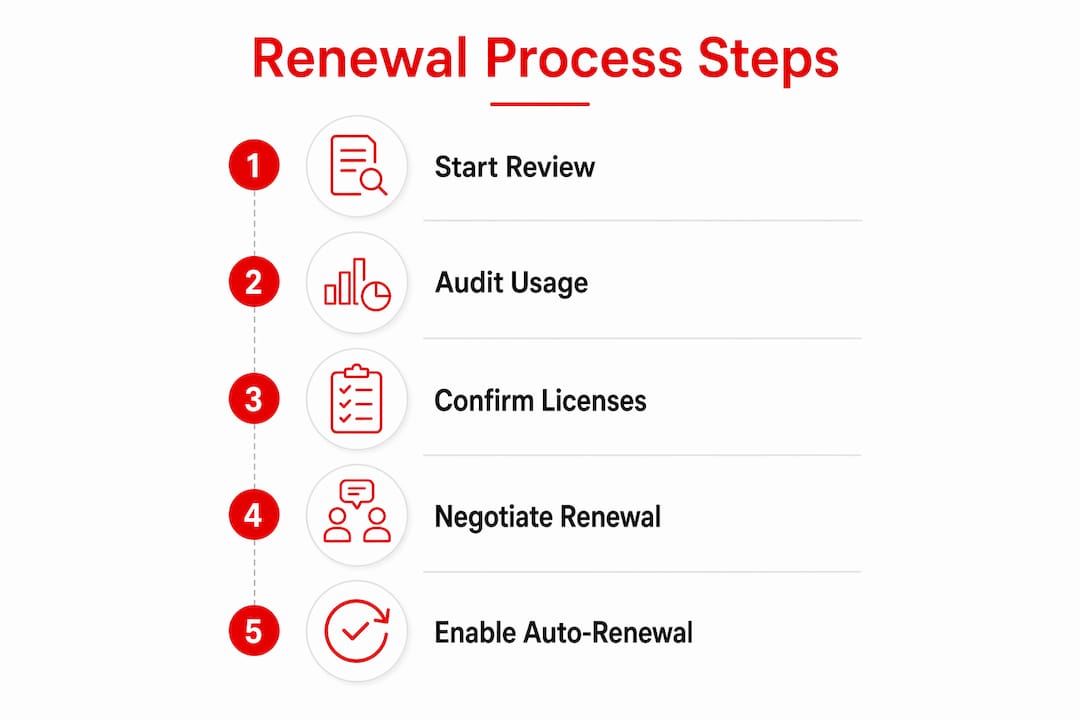
Preparation determines whether a renewal saves money or locks in unnecessary costs. Starting at least 90 days before expiration gives you time to analyze usage data, remove inactive accounts, and align renewal dates across your organization. That window is the difference between a controlled renewal and a reactive one.
Before initiating any renewal, complete these steps:
- Review current license types and expiration dates. Log into the Microsoft 365 admin center and navigate to Billing > Your products. Note every subscription, its expiration date, and its current billing cycle.
- Audit active users. Identify accounts that have not logged in recently. Removing inactive licenses before renewal directly reduces your renewal cost.
- Understand your pricing tier options. Microsoft offers three billing cycles: annual upfront (lowest cost), monthly commitment (approximately 5% higher), and monthly rolling (approximately 20% higher than annual). Choose based on your cash flow needs and usage certainty.
- Verify payment information. Outdated credit cards or expired purchase orders cause failed transactions. Confirm your payment method is current before the renewal date.
- Plan co-terming. If your organization holds multiple subscriptions with different expiration dates, co-terming aligns them to a single renewal date. This reduces fragmented billing cycles and simplifies administration.
Pro Tip: Start your renewal review 90 days out, not 30. Early review gives you time to run proper usage reports, reconcile license counts, and negotiate better terms before the renewal window closes.
How to renew your Microsoft business license step by step
The renewal procedure in the Microsoft 365 admin center follows a consistent sequence. Deviating from this sequence, particularly after a license has expired, creates the risk of generating a duplicate tenant. That outcome requires Microsoft support to resolve and can disrupt access for all users.
- Log into the Microsoft 365 admin center at admin.microsoft.com using a Global Administrator or Billing Administrator account.
- Navigate to Billing > Your products. This page lists every active and recently expired subscription tied to your tenant.
- Select the subscription you want to renew. Click on the subscription name to open its detail page.
- Choose Renew or Reactivate. Active subscriptions show a Renew option. Subscriptions within the EST window show Reactivate. Both options keep you within your existing tenant.
- Adjust license quantity. Increase or decrease the number of seats based on your usage audit. Reducing seats at renewal is one of the most direct ways to cut costs.
- Select your billing cycle. Annual upfront carries the lowest per-seat cost. Monthly commitment offers flexibility at a modest premium. Monthly rolling carries the highest cost and suits short-term needs only.
- Confirm your payment method. The admin center displays the payment method on file. Update it here if needed before proceeding.
- Submit the renewal order. Review the order summary, confirm the total, and submit. Save or print the order confirmation for your records.
- Enable auto-renewal. Toggle auto-renewal on within the subscription settings. Auto-renewal prevents service interruption if a future renewal review is delayed.
Pro Tip: Enable auto-renewal as a safety net, but schedule a calendar reminder to review your license counts and billing cycle 90 days before each renewal date. Auto-renewal charges your payment method at the current license count, which may be higher than you need.
Handling expired subscriptions

Buying new licenses through the public Microsoft signup page after expiration creates a new tenant instead of reactivating the existing one. Always reactivate from within your original tenant through the admin center or through your CSP partner. If the Reactivate option is not visible, contact your CSP partner directly before purchasing anything new.
How to optimize costs and manage risks during renewal
Renewals are not administrative tasks. Companies leave 18–33% potential savings on the table by treating renewals as routine checkboxes rather than financial decisions. That figure represents real budget that stays with your vendor instead of your business.
The 2026 policy changes make cost management more urgent. The key risks and opportunities are:
- EST exposure. Since may 4, 2026, the free 30-day grace period no longer exists. Inaction at expiration automatically moves your subscription into the Extended Service Term, which charges at the monthly rolling rate plus a 3% surcharge.
- License reconciliation. Audit every assigned license against active users before renewal. Remove seats tied to departed employees or unused accounts.
- Co-terming. Consolidate multiple renewal dates into one. This reduces the number of renewal events per year and may improve your negotiating position with your CSP partner.
- Billing cycle selection. Annual upfront is the baseline cost. Monthly commitment adds approximately 5%. Monthly rolling adds approximately 20%. EST adds the monthly rolling rate plus 3% on top.
- Cancel at expiry option. If you do not intend to renew a specific subscription, set it to “cancel at expiry” in the admin center. This prevents automatic EST enrollment.
- Discounted bundles. Microsoft offers bundled subscriptions such as Microsoft 365 Business Premium with Copilot at discounts available through certified partners. Techsolworld offers 20–30% off Microsoft subscriptions, which can offset renewal costs significantly.
| Billing cycle | Cost relative to annual upfront |
|---|---|
| Annual upfront | Baseline |
| Monthly commitment | Approximately 5% higher |
| Monthly rolling | Approximately 20% higher |
| Extended Service Term (EST) | Monthly rolling rate plus 3% surcharge |
“Treat every renewal as a financial audit, not a form submission. The window to correct license counts, renegotiate terms, and select the right billing cycle closes the moment you submit the order.”
Pro Tip: Negotiate renewals through a certified CSP partner. Partners have access to promotional pricing, bundle discounts, and co-terming tools that are not available through the self-service admin center.
Troubleshooting common issues in the renewal process
Renewal problems fall into a small number of predictable categories. Knowing them in advance prevents the most costly mistakes.
- Duplicate tenant creation. This is the most disruptive renewal error. It occurs when an admin purchases new licenses through the public signup page after expiration instead of reactivating within the existing tenant. Resolution requires Microsoft support and can take days. Always use the admin center or your CSP partner for reactivation.
- EST enrollment without intent. Under the 2026 rules, failing to act by the expiration date enrolls the subscription in EST automatically. The only prevention is setting auto-renewal or selecting “cancel at expiry” before the deadline.
- Payment failures. Expired credit cards or insufficient purchase order balances block renewal processing. Verify payment details at least two weeks before the renewal date.
- Missing renewal options. If the Renew or Reactivate button is not visible in the admin center, the subscription may have been purchased through a CSP partner. Contact that partner directly. Techsolworld provides Microsoft licensing support for exactly these situations.
- Incorrect license counts after renewal. Auto-renewal locks in the current seat count. If headcount changed since the last renewal, adjust the count manually before the renewal processes.
Pro Tip: Set a recurring quarterly calendar event to audit license assignments. Catching unused seats between renewals means you enter each renewal window with accurate data, not inflated counts from months ago.
Key Takeaways
The Microsoft business license renewal process requires proactive timing, accurate license counts, and the right billing cycle selection to avoid the 2026 EST surcharge and unnecessary cost.
| Point | Details |
|---|---|
| Start 90 days early | Begin your renewal review 90 days before expiration to audit usage and adjust seat counts. |
| EST is now automatic | Since may 2026, missing your renewal date triggers the Extended Service Term at a higher cost. |
| Billing cycle choice matters | Monthly rolling costs approximately 20% more than annual upfront; EST adds another 3% surcharge. |
| Avoid duplicate tenants | Always reactivate expired licenses from within your existing tenant, never through public signup. |
| Co-terming reduces complexity | Aligning multiple renewal dates to one date cuts administrative burden and may improve pricing. |
Why renewals deserve more attention than most businesses give them
Most businesses I work with treat license renewal as a calendar reminder and a form to fill out. That approach costs real money every year. The removal of the free grace period in may 2026 changed the stakes. There is no longer a buffer for slow decisions. The moment a subscription expires without a renewal or cancellation instruction, the meter starts running at the highest available rate.
The businesses that manage licensing well share one habit: they review their license assignments before the renewal window opens, not during it. That review catches the departed employees still holding seats, the test accounts that never got cleaned up, and the premium tiers that were added for a project and never removed. Those corrections, made before renewal, translate directly into lower invoices.
The 2026 policy shift also makes the choice of CSP partner more consequential. A certified partner with Microsoft licensing expertise can apply co-terming, access bundle pricing, and flag EST exposure before it becomes a charge on your account. Self-service renewal through the admin center works for straightforward cases. For organizations with multiple subscription types, multiple billing cycles, or recent headcount changes, a qualified partner is the more cost-effective path.
— Technology
Technology Solutions Worldwide Microsoft licensing support for renewal management
Managing the renewal process across multiple subscriptions, billing cycles, and user counts is a time-intensive task with real financial consequences if handled incorrectly.
Technology Solutions Worldwide is a Microsoft Solutions Partner with over 20 years of experience in Microsoft licensing and migration. The team handles license procurement, renewal management, co-terming, and compliance reviews for organizations of all sizes, including government agencies and enterprise clients such as Coca-Cola and T-Mobile. Technology Solutions Worldwide offers 20–30% off Microsoft subscriptions and provides direct support for complex renewal cases, including EST remediation and expired license reactivation. Contact Technology Solutions Worldwide through the Microsoft licensing help page to get a personalized licensing review before your next renewal date.
FAQ
What is the Microsoft business license renewal process?
The Microsoft business license renewal process is the sequence of steps required to extend an active Microsoft 365 or CSP subscription past its expiration date. It runs through the Microsoft 365 admin center or a certified CSP partner and includes license review, payment confirmation, billing cycle selection, and order submission.
What happens if I miss my Microsoft license renewal date in 2026?
Since may 4, 2026, missing a renewal date automatically enrolls the subscription in the Extended Service Term (EST). EST charges at the monthly rolling rate plus a 3% surcharge, with no free grace period.
How do I avoid creating a duplicate tenant when renewing an expired license?
Always reactivate an expired subscription from within your existing tenant through the Microsoft 365 admin center or your CSP partner. Purchasing new licenses through the public Microsoft signup page after expiration creates a separate tenant and does not restore access to your original environment.
What is the cheapest billing cycle for Microsoft 365 renewals?
Annual upfront is the lowest-cost billing cycle. Monthly commitment costs approximately 5% more, monthly rolling costs approximately 20% more, and the Extended Service Term adds a further 3% surcharge on top of the monthly rolling rate.
How can co-terming reduce my Microsoft licensing costs?
Co-terming aligns multiple renewal dates to a single date, reducing the number of separate renewal events per year. This simplifies administration and can improve your negotiating position with your CSP partner at renewal time.
Recommended
- Microsoft licenses and migration services
- Microsoft Licensing Help | Techsolworld
- Microsoft Office License: A Must-Have for Every Business
- Windows 11 Enterprise LTSC 2024 Upgrade: A Complete Guide for Businesses – Technology Solutions
YOU CAN VIEW A FULL LISTING OF OUR BUSINESS LICENSE OPTIONS HERE FOR NEW PURCHASE OR RENEWALS HERE.
For personalized quotes or questions, email [email protected] or call (800)998-2792.