
The Microsoft 365 Enterprise bundle is defined as a unified subscription platform that combines Office productivity apps, Windows 11 Enterprise, cloud services, and advanced security tools into a single, per-user license for large organizations. This is the industry term for what Microsoft formally calls a Microsoft 365 Enterprise plan, covering tiers E3, E5, and F3. The bundle goes far beyond word processing and spreadsheets. It functions as a centralized governance platform for identity management, endpoint security, regulatory compliance, and workforce collaboration. Organizations with complex IT environments, strict compliance requirements, or workforces exceeding 300 users will find the Enterprise tier is the only Microsoft 365 offering built to match that scale.
What is the Microsoft 365 Enterprise bundle and what does it include?
The Microsoft 365 Enterprise bundle packages four distinct layers into one subscription: productivity apps, cloud services, operating system licensing, and security tools. Each layer is designed to work with the others, which reduces the need for separate vendor contracts.
Core productivity apps and cloud services
The bundle includes the full Office suite: Word, Excel, PowerPoint, Outlook, and OneNote. These apps are available as desktop installs, web apps, and mobile versions. Cloud services included are Exchange Online for email, SharePoint for document management, OneDrive for cloud storage, and Microsoft Teams for communication and video conferencing.

Windows 11 Enterprise and device management
Windows 11 Enterprise is included in E3 and E5 plans, providing a managed operating system environment critical for enterprise endpoint protection. This matters because organizations do not need a separate Windows license for enrolled devices. Microsoft Intune handles device enrollment, policy enforcement, and remote management across Windows, iOS, Android, and macOS endpoints.
Security and identity tools
Microsoft Defender for Endpoint provides threat detection and automated response at the device level. Microsoft Purview covers data governance, information protection, and compliance reporting. Microsoft Entra ID, formerly known as Azure Active Directory, manages user identity and access across all connected apps and services. Advanced identity protection through Entra ID is a core reason enterprises choose this bundle over smaller business plans.
Pro Tip: Set up Microsoft Entra ID with clean tenant configuration before deploying any other Enterprise feature. A disorganized identity layer creates cascading access and compliance problems that are expensive to fix later.
How do Microsoft 365 Enterprise plans E3, E5, and F3 differ?
The three Enterprise licensing tiers target different user roles and security requirements. Selecting the right mix is the single most effective way to control licensing costs at scale.
| Plan | Target user | Key additions | Best for |
|---|---|---|---|
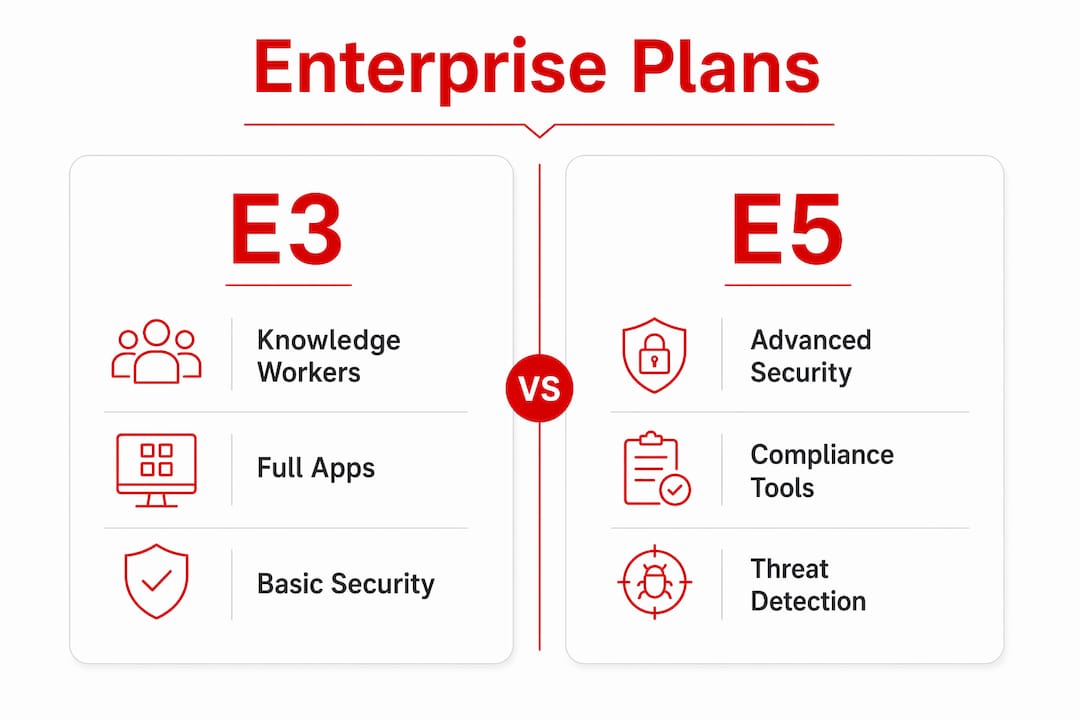
| E3 | Knowledge workers | Full desktop apps, base security, Intune, Entra ID | Standard office and remote staff |
| E5 | Security and compliance leads | Defender advanced, Purview advanced, voice, analytics | IT admins, legal, finance, executives |
| F3 | Frontline and shift workers | Web and mobile apps only, secure identity access | Retail, manufacturing, field staff |
E3: the core plan for knowledge workers
E3 is the standard plan for employees who need full desktop Office apps and foundational security. It includes Intune, Entra ID, and base Defender capabilities. E3 covers the majority of office and remote workers in most enterprise organizations.
E5: advanced security and compliance
E5 adds Microsoft Defender for Identity, Microsoft Defender for Cloud Apps, Purview advanced compliance, and Microsoft Teams Phone. These additions are not optional for organizations under strict regulatory frameworks such as HIPAA, FedRAMP, or SOC 2. The price difference between E3 and E5 is significant, which is why assigning E5 only to roles that require it is the standard practice.
F3: purpose-built for frontline staff
F3 plans provide secure access to essential collaboration tools at a significantly lower cost than full desktop suites. F3 users get web and mobile app access, Teams, and secure identity management through Entra ID. They do not get desktop Office installs or advanced compliance tools. This makes F3 the correct license for warehouse workers, retail associates, and field technicians.
Mixing plans to reduce cost
A mixed licensing model using majority E3, selective E5, and frontline F3 licenses reduces licensing costs by 20–30% compared to flat licensing across all users. That reduction is meaningful at enterprise scale. Assigning E5 to every employee when only the security team needs advanced Defender features is a common and expensive mistake.
Pro Tip: Audit user roles before purchasing. Categorize staff into knowledge workers, security-sensitive roles, and frontline workers. Then map each category to E3, E5, or F3 accordingly. Revisit the audit every six months as headcount changes.
What are the security and compliance benefits of Microsoft 365 Enterprise?
The Enterprise bundle functions as a security and governance platform, not just a productivity suite. This distinction matters when evaluating total IT spend.
Key security and compliance capabilities included in Enterprise plans:
- Microsoft Defender for Endpoint: Detects, investigates, and automatically responds to threats across enrolled devices without requiring a separate security vendor.
- Microsoft Intune: Enforces device compliance policies, manages app deployment, and supports zero-trust access controls across all device types.
- Microsoft Purview: Provides data classification, retention policies, eDiscovery, and audit logs required for regulatory compliance.
- Microsoft Entra ID: Controls conditional access, multi-factor authentication, and privileged identity management across the entire tenant.
- Remote Help: An automated device troubleshooting tool that reduces IT support tickets by identifying device issues before they escalate.
Microsoft Intune and Defender for Endpoint together reduce reliance on third-party security vendors and lower the total cost of endpoint protection. Replacing separate endpoint management, antivirus, and compliance tools with integrated Microsoft components also reduces the number of vendor contracts IT teams must manage. Fewer integrations mean fewer failure points and simpler audit trails.
The bundle also replaces isolated third-party security tools with a unified platform, reducing vendor count and friction for IT administrators. Organizations that previously ran separate tools for email security, device management, and data loss prevention can consolidate all three under a single Microsoft admin center.
Is Microsoft 365 Enterprise worth it? Pricing and decision factors
Microsoft 365 Enterprise pricing is structured per user per month, billed annually. Exact list prices are available directly from Microsoft and vary by region and agreement type. The key decision factors are organizational size, compliance requirements, and workforce composition.
Signs that an organization needs Enterprise tier licensing:
- Headcount exceeds 300 users. Business plans cap at 300 users, making Enterprise plans the only option for larger organizations. Business Premium offers strong features but cannot scale beyond that limit.
- Regulatory compliance is mandatory. Industries subject to HIPAA, GDPR, FedRAMP, or SOC 2 need the advanced Purview compliance tools only available in E3 and E5.
- The organization uses hybrid or multi-device environments. Intune and Entra ID in Enterprise plans manage mixed device fleets that smaller plans cannot handle at the same depth.
- IT needs centralized security reporting. The Microsoft Defender portal and Purview compliance center provide unified dashboards not available in Business plans.
- Frontline workers need secure, low-cost access. F3 licenses cover this use case without paying for desktop apps that frontline staff will never use.
Volume licensing through Microsoft Enterprise Agreements provides additional cost benefits for organizations committing to three-year terms. Volume licensing structures allow organizations to negotiate pricing, add seats mid-term, and access Software Assurance benefits. Organizations migrating from Business to Enterprise plans should pre-plan security policies and identity management to avoid compliance gaps during the transition.
Enterprise plans also receive over 1,100 feature updates annually, which means the platform’s capabilities grow continuously without requiring additional purchases. That update cadence reinforces the value of treating Enterprise licensing as a long-term infrastructure investment rather than a one-time software purchase.
Key Takeaways
The Microsoft 365 Enterprise bundle delivers the most value when organizations match each license tier to specific user roles rather than applying a single plan across all staff.
| Point | Details |
|---|---|
| Enterprise bundle definition | A unified platform combining Office apps, Windows 11 Enterprise, cloud services, and security tools per user. |
| Three licensing tiers | E3 for knowledge workers, E5 for security-sensitive roles, F3 for frontline staff at lower cost. |
| Mixed licensing saves 20–30% | Assigning E3, E5, and F3 by role reduces total licensing spend versus flat licensing. |
| Security is the core value | Intune, Defender, Purview, and Entra ID replace multiple third-party tools in one subscription. |
| Business plans cap at 300 users | Organizations above that threshold require Enterprise plans to maintain scale and compliance. |
The licensing mistake most organizations make
Treating Microsoft 365 Enterprise as a productivity purchase is the most common and costly error I see in enterprise IT planning. The Office apps are the visible layer. The real value sits underneath: identity governance through Entra ID, endpoint control through Intune, and threat response through Defender. Organizations that buy E5 for every employee without auditing who actually needs advanced Defender or Purview features are paying for capabilities that sit unused. That is not a Microsoft problem. It is a planning problem.
Enterprise licensing should be treated as a dynamic governance project, not a one-time purchase. User roles change. Headcount grows. Compliance requirements shift. A license assignment that made sense at 400 users may be inefficient at 1,200. The organizations that get the most from their Enterprise investment review license assignments at least twice a year and adjust the E3, E5, and F3 mix accordingly.
The other underestimated factor is the update cadence. Enterprise plans receive over 1,100 feature updates annually. That means the platform you bought in january is meaningfully different by july. IT teams that do not track these updates miss automation tools, security improvements, and compliance features that are already included in the license they are paying for.
— Technology
Techsolworld’s Microsoft 365 Enterprise licensing support
Techsolworld is a certified Microsoft Gold Partner with over 20 years of experience in Microsoft licensing support and migration services. Organizations working through Enterprise plan selection, tier optimization, or migration from Business plans get direct access to licensing specialists who have managed deployments for clients including government agencies, Coca-Cola, and T-Mobile.
Techsolworld offers competitive discounts of 20–30% off Microsoft subscriptions and provides structured guidance on matching E3, E5, and F3 licenses to actual workforce roles. For organizations moving from GoDaddy-hosted Microsoft 365 or from Business Premium to Enterprise, Techsolworld manages the full licensing and migration process to avoid compliance gaps and downtime. Contact Techsolworld directly for a licensing assessment tailored to your organization’s size, industry, and security requirements.
FAQ
What is included in the Microsoft 365 Enterprise bundle?
The Microsoft 365 Enterprise bundle includes Office apps (Word, Excel, PowerPoint, Outlook), cloud services (Exchange Online, SharePoint, OneDrive, Teams), Windows 11 Enterprise, Microsoft Intune, Defender for Endpoint, Purview compliance tools, and Microsoft Entra ID for identity management.
What is the difference between Microsoft 365 Enterprise E3 and E5?
E3 covers full desktop Office apps, Intune, and base security tools. E5 adds advanced Defender capabilities, Purview advanced compliance, Microsoft Defender for Identity, and Teams Phone for organizations with stricter security and regulatory requirements.
How many users does Microsoft 365 Business support before Enterprise is required?
Microsoft 365 Business plans cap at 300 users. Organizations above that threshold must move to Enterprise plans to maintain full feature access and administrative control at scale.
Can organizations mix E3, E5, and F3 licenses?
Yes. A mixed licensing model assigning E3 to knowledge workers, E5 to security-sensitive roles, and F3 to frontline staff reduces total licensing costs by 20–30% compared to applying a single plan across all users.
Is Microsoft 365 Enterprise worth it for mid-sized organizations?
Microsoft 365 Enterprise is worth it for any organization above 300 users, subject to regulatory compliance requirements, or managing a mixed device environment. The integrated security and device management tools replace multiple third-party products, which reduces total IT spend over time.
Love how you create content that both educates and entertains your readers perfectly