
A Complete Guide to Microsoft 365 Business Renewal, Available Plans, Pricing, and How to Save 30–45% by Moving to a Microsoft CSP
Microsoft 365 has become the foundation of productivity for millions of businesses worldwide. Moreover, whether your organization uses Microsoft 365 Business Basic, Business Standard, Business Premium, or Apps for Business, maintaining an active subscription is critical to ensuring uninterrupted access to email, collaboration tools, cloud storage, Microsoft Teams, and Office applications. Therefore, because these applications, services, and licenses are business critical, it is important to learn the best way to renew your Microsoft 365 Business Subscription.
In short, as renewal time approaches, organizations have an opportunity to do more than simply renew their licenses. After that, a renewal period is the ideal time to evaluate licensing requirements, optimize costs, improve security, and potentially transition from expensive purchasing models such as Microsoft Direct or Enterprise Agreements (EA) to a more flexible and cost-effective Microsoft Cloud Solution Provider (CSP) model.
Subsequently, Technology Solutions Worldwide helps organizations streamline Microsoft renewals while significantly reducing licensing costs. Certainly, as a Microsoft CSP, Microsoft MSP, Microsoft LSP, Microsoft AOS-G Partner, and Microsoft Reseller, Technology Solutions Worldwide helps businesses optimize licensing while delivering substantial savings.
Why Microsoft 365 Renewal Planning Matters
Many organizations simply renew existing licenses without reviewing actual usage.
This often results in:
- Paying for unused licenses
- Purchasing higher-tier subscriptions than necessary
- Missing security opportunities
- Overlooking new Microsoft features
- Paying higher pricing through Microsoft Direct or Enterprise Agreements
A proper renewal review can help organizations:
- Reduce costs
- Improve productivity
- Strengthen cybersecurity
- Simplify administration
- Align licensing with business growth
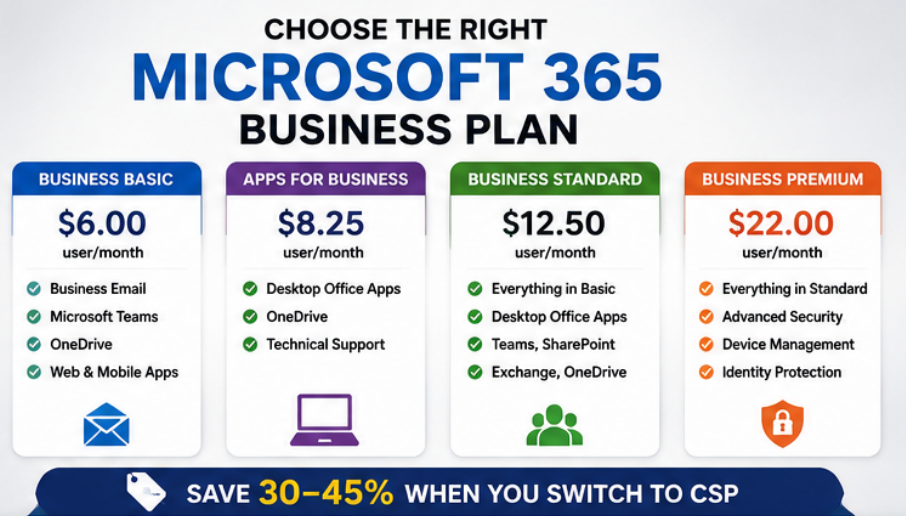
How to save while renewing Microsoft 365 Business Plans.
Step 1: Review Your Current Microsoft Licensing
In short, before renewing, review your current Microsoft 365 environment.
Evaluate:
- Number of active users
- Number of inactive users
- Assigned licenses
- Security requirements
- Compliance requirements
- Storage consumption
- Device management needs
- Microsoft Teams usage
To sum up, many organizations discover they are paying for licenses assigned to former employees or users who no longer require premium features.
Step 2: Evaluate Current Business Requirements
Organizations evolve over time.
Questions to ask include:
Has your employee count increased?
Growing companies often outgrow their original licensing structure.
Has remote work increased?
Additional security and device management capabilities may be necessary.
Are cybersecurity requirements changing?
Organizations handling sensitive information may benefit from Business Premium.
Are desktop Office applications still required?
Some users may only need web-based applications.
In short, proper license alignment can significantly reduce annual costs.
Step 3: Determine Which Microsoft 365 Business Plan Fits Your Needs
Microsoft offers several business subscriptions designed for organizations with up to 300 users.
Microsoft 365 Business Basic
Microsoft’s Current Pricing
- Annual Commitment: $6.00 per user/month
Includes
- Business email
- Exchange Online
- Microsoft Teams
- OneDrive
- SharePoint
- Web versions of Office applications
Best For
- Small businesses
- Startups
- Nonprofits
- Front-office employees
- Browser-based users
Advantages
- Lowest-cost Microsoft business plan
- Professional email
- Cloud collaboration
- Microsoft Teams included
Microsoft 365 Apps for Business
Microsoft’s Current Pricing
- Approximately $8.25–$8.30 per user/month with annual commitment
Includes
- Desktop Word
- Excel
- PowerPoint
- Outlook
- OneDrive
Best For
Organizations that need desktop Office applications but already have email services.
Advantages
- Full desktop applications
- Offline productivity
- Lower cost than Business Standard
Microsoft 365 Business Standard
Microsoft’s Current Pricing
- Annual Commitment: $12.50 per user/month
Includes
- Desktop Office applications
- Exchange Online
- Microsoft Teams
- SharePoint
- OneDrive
- Outlook
- Bookings
- Planner
- Loop
- Clipchamp
Best For
Growing businesses needing desktop productivity and collaboration.
Advantages
- Full Office applications
- Professional email
- Excellent collaboration capabilities
- Most popular Microsoft business license
Microsoft 365 Business Premium
Microsoft’s Current Pricing
- Annual Commitment: $22.00 per user/month
- Monthly Commitment: Approximately $26.40 per user/month
Includes
Everything in Business Standard plus:
- Microsoft Intune
- Microsoft Defender for Business
- Conditional Access
- Advanced Identity Protection
- Mobile Device Management
- Endpoint Security
Best For
Organizations requiring advanced cybersecurity and device management.
Advantages
- Enterprise-grade security
- Remote workforce protection
- Strong compliance capabilities
- Excellent value for security-conscious businesses

How to renew Microsoft 365 licenses
Step 4: Select Annual vs Monthly Billing
Organizations typically choose between:
Annual Commitments
Advantages:
- Lower monthly pricing
- Predictable budgeting
- Best long-term value
Monthly Commitments
Advantages:
- Greater flexibility
- Easier workforce adjustments
- No long-term commitment
Disadvantages:
- Higher overall costs
Moreover, most organizations benefit from annual subscriptions due to lower pricing.
Step 5: Renew Through the Right Microsoft Licensing Program
To clarify, this is where organizations often miss substantial savings opportunities.
Meanwhile, there are several ways to purchase Microsoft licenses:
Microsoft Direct
Purchasing directly from Microsoft.
Enterprise Agreement (EA)
Traditionally used by medium and large organizations.
Microsoft Cloud Solution Provider (CSP)
Consequently, this is the fastest-growing Microsoft purchasing model.
For many organizations, CSP provides the best combination of flexibility, support, and cost savings.
Why Organizations Are Leaving Enterprise Agreements
On the other hand, Enterprise Agreements were the preferred licensing model for larger organizations.
Today, many organizations are transitioning from EA to CSP because of:
- Simplified administration
- Flexible licensing
- Easier renewals
- Better support
- Reduced licensing complexity
- Lower overall costs
Moving from Microsoft EA to CSP
If your Enterprise Agreement is approaching renewal, this is an ideal time to evaluate a migration to CSP.
Technology Solutions Worldwide helps organizations smoothly transition from Enterprise Agreements to CSP while minimizing disruption.
Benefits include:
Significant Cost Reduction
Organizations commonly realize savings of approximately 30–40% compared to traditional licensing costs when transitioning from EA environments.
Simplified Management
CSP licensing eliminates many of the complexities associated with Enterprise Agreement administration.
Greater Flexibility
Add or remove licenses as business requirements change.
Personalized Support
Receive direct licensing expertise from Microsoft specialists.
Moving from Microsoft Direct to CSP
Many organizations purchase licenses directly from Microsoft without realizing alternative purchasing options exist.
By transitioning from Microsoft Direct purchasing to a CSP model, organizations often reduce costs significantly while receiving enhanced support and licensing guidance.
Technology Solutions Worldwide regularly helps organizations move from Microsoft Direct purchasing to CSP environments while optimizing licensing and reducing expenses.
Many organizations experience cost reductions of approximately 40–45% compared to their existing purchasing model.
Additional Benefits of CSP Licensing
To clarify, when working with Technology Solutions Worldwide, organizations gain access to:
- Licensing optimization
- Dedicated account management
- Microsoft migration assistance
- Security assessments
- Tenant reviews
- User onboarding support
- Renewal planning
- Ongoing licensing consultation

Learn how to renew Microsoft 365 Business Plans effortlessly.
Why Work with Technology Solutions Worldwide?
Technology Solutions Worldwide is a trusted Microsoft partner providing licensing, cloud services, cybersecurity, and managed services solutions.
Our credentials include:
- Microsoft Cloud Solution Provider (CSP)
- Microsoft Managed Service Provider (MSP)
- Microsoft Licensing Solution Provider (LSP)
- Microsoft AOS-G Partner
- Microsoft Reseller
Our team helps organizations:
- Renew Microsoft subscriptions
- Reduce licensing expenses
- Transition from Enterprise Agreements
- Migrate from Microsoft Direct purchasing
- Improve cybersecurity
- Optimize Microsoft environments
Start Your Microsoft Renewal Review Today
Moreover, before renewing your Microsoft 365 Business subscriptions, ensure you are receiving the best value, the correct licensing, and the most cost-effective purchasing model.
On the other hand, whether you currently purchase through Microsoft Direct, an Enterprise Agreement, or another reseller, Technology Solutions Worldwide can review your environment and identify opportunities to reduce costs while improving productivity and security.
Contact Technology Solutions Worldwide
Phone: (800) 998-2792
Email: [email protected]
In conclusion, our Microsoft licensing specialists can help your organization evaluate renewal options, optimize licensing, and determine whether moving to a CSP agreement is the right strategy for your business.