
Microsoft Business Standard is a productivity subscription that includes premium Office desktop apps, professional email via Exchange, cloud storage through OneDrive, and advanced Microsoft Teams collaboration features. For instance, the plan targets small to medium-sized businesses with 1 to 300 users that need full-featured remote work tools without enterprise-level IT complexity. Most importantly, understanding what does Microsoft Business Standard include helps IT managers and business owners make a direct, cost-effective licensing decision. Hence, this article covers every major component, how the plan compares to adjacent tiers, and what to expect during setup.
What does Microsoft Business Standard include?
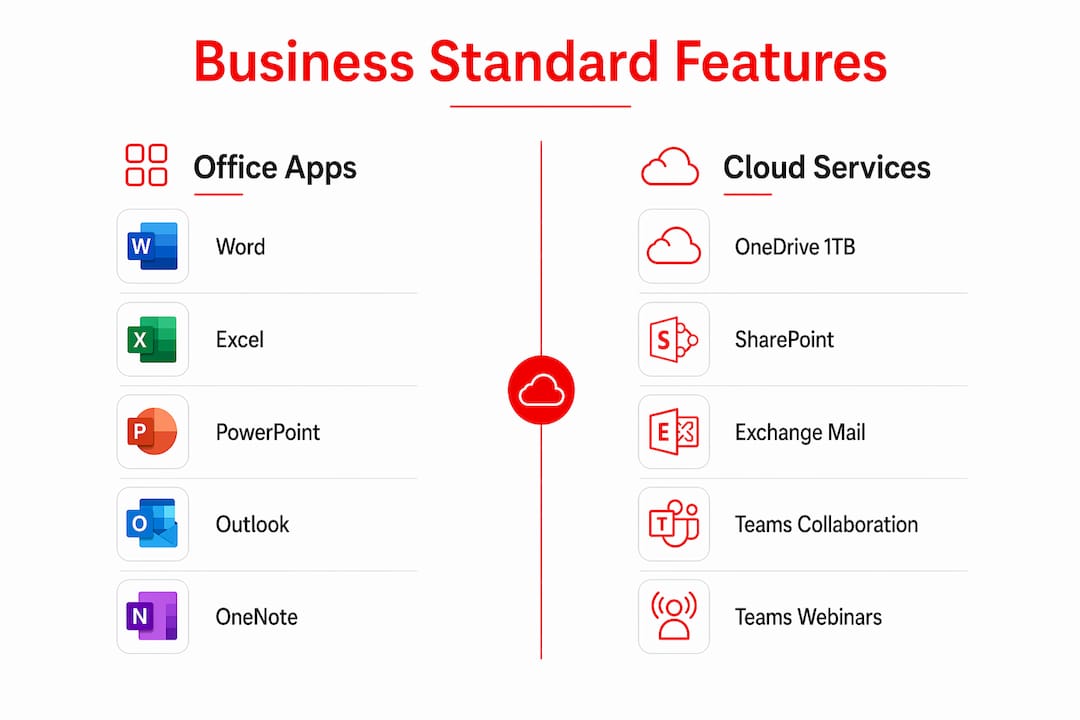
Business Standard delivers a complete set of productivity apps and cloud services built for day-to-day business operations. Therefore, the plan covers desktop software, email hosting, file storage, and collaboration tools under a single per-user subscription.
Core Office desktop applications
Business Standard includes premium desktop apps with full feature sets, unlike the Basic tier which provides web and mobile versions only. Additional, that distinction matters for teams that rely on advanced Excel functions, complex Word formatting, or PowerPoint animations that the browser versions do not fully support.
The desktop applications included are:
- Microsoft Word — full document creation and editing
- Microsoft Excel — complete spreadsheet and data analysis tools
- Microsoft PowerPoint — full presentation design features
- Microsoft Outlook — desktop email and calendar client
- Microsoft OneNote — digital notebook for notes and research
- Microsoft Access and Publisher — available on PC only
Moreover, each app installs on up to five PCs or Macs, five tablets, and five mobile devices per user. That coverage supports hybrid teams working across multiple devices without additional licensing.
Email hosting with Exchange
Exchange provides a 50 GB inbox and full calendaring for every user on the plan. Hence, that inbox size handles years of business correspondence without requiring manual archiving for most teams.
Exchange also supports shared calendars and compliance requirements for regulated industries when configured correctly. Additionally, businesses in healthcare, finance, or legal services can use Exchange’s built-in retention and audit features to meet baseline record-keeping standards.
OneDrive and SharePoint storage
Each user receives 1 TB of OneDrive cloud storage for personal file storage and sync. SharePoint is included for team-level document libraries, intranet sites, and shared file management across departments.
Business Standard also integrates with external apps like Salesforce and Adobe through Microsoft Graph APIs. That connectivity reduces manual data transfer between platforms and keeps workflows inside familiar tools.
What collaboration tools come with Business Standard?
Microsoft Teams is the primary collaboration hub in Business Standard. It covers chat, video meetings, file sharing, and channel-based project communication in one interface.

Teams webinars and meeting features
Business Standard supports Teams webinars for up to 300 participants with registration pages and event management tools. That capability is absent from the Basic tier, making Standard the entry point for businesses that host client-facing events, training sessions, or product demos.
The webinar feature includes attendee registration, email reminders, and presenter controls. For a small business running monthly client webinars, this removes the need for a separate third-party webinar platform.
Additional collaboration apps included with the plan:
- Microsoft Loop — real-time co-editing of content across apps and devices
- Clipchamp — browser-based video editing for marketing and internal communications
- Microsoft Planner — task and project tracking for teams
- Microsoft Forms — surveys, quizzes, and data collection
- Microsoft Bookings — appointment scheduling for client-facing teams
Pro Tip: Use Microsoft Loop components inside Teams chats to keep project notes, task lists, and decisions in one place. Loop blocks update live across every app where they are embedded, so no one works from an outdated version.
Teams also integrates directly with SharePoint for document co-authoring during meetings. Teams channels can be connected to SharePoint document libraries, which keeps file versions consistent across the entire team.
For businesses that want to extend Teams with phone calling, the Microsoft 365 Business Voice add-on connects directly to Business Standard subscriptions.
How does Business Standard compare to other Microsoft 365 plans?
Microsoft positions Business Standard for SMBs that need remote collaboration tools without advanced endpoint security. Therefore, that positioning places it between the web-only Basic tier and the security-focused Premium tier.
The table below compares the three main Microsoft 365 business plans by feature category:
| Feature category | Business Basic | Business Standard | Business Premium |
|---|---|---|---|
| Desktop Office apps | Web and mobile only | Full desktop install | Full desktop install |
| Exchange email (50 GB) | Included | Included | Included |
| Teams webinars (300 attendees) | Not included | Included | Included |
| Microsoft Loop and Clipchamp | Not included | Included | Included |
| Microsoft Defender for Business | Not included | Not included | Included |
| Microsoft Intune device management | Not included | Not included | Included |
| Azure AD Premium P1 | Not included | Not included | Included |
Business Premium adds Microsoft Defender and Intune, which are endpoint protection and device management tools absent from Standard. Those tools matter for businesses with strict data governance requirements or a distributed device fleet that IT needs to control remotely.
SMBs with 1 to 300 users get the best value from Business Standard when their primary needs are productivity and collaboration rather than device security. A 20-person marketing agency, a regional law firm, or a growing retail operation fits this profile well. A healthcare provider storing patient data on employee devices would be better served by Premium’s endpoint controls.
For a full side-by-side breakdown, Technology Solutions Worldwide publishes a detailed plan comparison for Business tiers that covers pricing and feature differences in one place.
Setup considerations for Microsoft Business Standard
Business Standard offers two sign-up paths. The first is a quick setup using an existing personal or non-branded email address. The second attaches a custom business domain during setup to create branded email addresses.
Two sign-up options exist: quick onboarding for immediate access, or a detailed setup that connects a custom domain. Additionally, the quick path gets a team into the apps within minutes but leaves users with generic Microsoft-hosted addresses, which looks unprofessional in client communications.
Key setup steps for the custom domain path:
- Purchase or confirm ownership of a business domain (e.g., yourcompany.com)
- Add the domain in the Microsoft 365 Admin Center
- Update DNS records at your domain registrar (MX, CNAME, TXT records)
- Assign user licenses and configure Outlook profiles
- Migrate existing email if moving from a previous provider
Pro Tip: Attach your custom domain early during setup rather than adding it later. Retrofitting a domain after users are already active creates DNS conflicts, broken email flows, and extra admin work that takes hours to untangle.
DNS propagation typically takes up to 48 hours after records are updated. Therefore, plan the cutover during a low-traffic period, such as a Friday evening, to minimize disruption to email flow. Hence, assign a global admin account that is separate from daily-use accounts to protect administrative access if a user account is compromised.
Key Takeaways
Microsoft Business Standard is the right Microsoft 365 plan for SMBs that need full desktop Office apps, professional email, and Teams webinars without paying for enterprise security tools.
| Point | Details |
|---|---|
| Full desktop apps included | Word, Excel, PowerPoint, Outlook, and OneNote install on up to five devices per user. |
| Exchange email with 50 GB inbox | Every user gets branded email, shared calendars, and baseline compliance features. |
| Teams webinars for 300 attendees | Business Standard is the entry-level plan that supports external-facing webinar events. |
| Premium vs. Standard security gap | Business Premium adds Defender and Intune; Standard does not include endpoint protection. |
| Custom domain setup is best practice | Attach your business domain during initial setup to avoid DNS and email flow problems later. |
The right plan for most growing businesses
Subsequently, after working with SMBs across industries, the pattern is consistent. In addition, most businesses under 100 employees do not need the device management controls in Business Premium. They need reliable email, desktop Office apps that work offline, and a meeting platform that handles client calls and internal collaboration. Certainly, Business Standard covers all of that.
The webinar capability is underused and underappreciated. A 300-attendee webinar with registration and event management built into Teams removes the cost of a standalone webinar tool entirely. For a business running quarterly client updates or monthly training sessions, that is a real budget line eliminated.
The one area where Standard falls short is endpoint security. If your team uses personal devices to access company data, or if you operate in a regulated industry, the lack of Microsoft Intune and Defender for Business is a genuine gap. In those cases, the step up to Business Premium is worth the additional cost per user.
For most professional services firms, agencies, and growing SMBs, Business Standard hits the right balance. It is not the cheapest option, but it is the most complete productivity package before security tooling becomes a requirement.
Purchase Microsoft 365 Business Standard for the lowest price possible HERE.
— Technology
Technology Solutions Worldwide’s Microsoft licensing support for SMBs
Technology Solutions Worldwide is a Microsoft Gold Partner with over 20 years of experience in Microsoft licensing and migration services for businesses of all sizes. Additionally, clients including government agencies and major corporations rely on Technology Solutions Worldwide for accurate license procurement and smooth platform transitions.
In conclusion, Technology Solutions Worldwide offers 20–30% discounts on Microsoft 365 subscriptions and provides direct support for Business Standard setup, domain configuration, and user onboarding. Additionally, for SMBs moving off legacy email systems or on-premises Office installs, the migration team handles DNS cutover, data transfer, and post-migration validation. Therefore, contact Technology Solutions Worldwide’s Microsoft licensing support team to get the right plan at the right price with expert guidance from day one.
FAQ
What apps are included in Microsoft Business Standard?
Microsoft Business Standard includes Word, Excel, PowerPoint, Outlook, OneNote, Teams, OneDrive, SharePoint, Loop, Clipchamp, Planner, Forms, and Bookings. Desktop apps install on up to five devices per user.
How many users can Microsoft Business Standard support?
Business Standard supports between 1 and 300 users per subscription. Organizations above 300 users require an enterprise-level Microsoft 365 plan.
Does Business Standard include Microsoft Teams webinars?
Yes. Business Standard includes Teams webinars for up to 300 participants with registration and event management features. This capability is not available in the Basic tier.
What is the difference between Business Standard and Business Premium?
Business Premium adds Microsoft Defender for Business and Intune for endpoint protection and device management. As a result, Business Standard does not include those security tools.
Can I use a custom domain with Microsoft Business Standard?
Yes. Business Standard supports custom domain attachment through the Microsoft 365 Admin Center. To sum up, setting up the domain during initial signup avoids DNS complications and delivers professional branded email from day one.