
Microsoft server licensing is defined as a core-based licensing framework that grants organizations the legal right to run Windows Server software on physical hardware and virtual machines. Every server running Windows Server Standard or Datacenter must have all its physical cores licensed, and every user or device accessing that server requires a Client Access License (CAL). Getting this wrong exposes organizations to audit risk, retroactive fees, and compliance gaps. This article breaks down the core model, edition differences, CAL requirements, and cost optimization tactics so you can make informed decisions for your infrastructure.
What is Microsoft server licensing and how does it work?
Microsoft server licensing is the formal term for the rights and rules Microsoft assigns to organizations running Windows Server on physical or virtual infrastructure. The licensing model is core based, meaning the number of physical processor cores in your server hardware determines how many licenses you need.

Licenses are sold in 2-core packs as the smallest available unit. Microsoft does not sell single-core licenses. This means your total license count must always be a multiple of two.
The two primary editions covered by this model are Windows Server Standard and Windows Server Datacenter. Both use the same core-based counting method, but they differ significantly in virtualization rights and price. Choosing the wrong edition for your workload is one of the most common and costly mistakes organizations make.
How does the core-based licensing model work?
The core-based model requires a license for every physical core in the server. Microsoft sets mandatory minimums to prevent organizations from under-licensing low-core-count hardware.
The minimums are:
- 8 core licenses per physical processor (socket)
- 16 core licenses per physical server, regardless of actual core count
- Licenses purchased in 2-core packs only
A server with two processors, each containing 10 physical cores, requires 20 core licenses total. That exceeds the 16-core server minimum, so the actual core count drives the requirement.
Physical cores are the only cores counted for licensing purposes. Logical cores created by Hyper-Threading or Simultaneous Multithreading (SMT) do not increase your license count. A 10-core processor with Hyper-Threading enabled presents 20 logical cores to the operating system, but Microsoft still counts only 10 physical cores for licensing.
This distinction matters in practice. Physical core counting is critical for compliance, yet many organizations overlook it, which leads to audits and costly retroactive licensing. Always pull your core count from hardware documentation or a tool like CPU-Z, not from the Windows Device Manager, which shows logical cores.
| Scenario | Physical cores | Minimum licenses required |
|---|---|---|
| Single-socket, 4-core server | 4 | 16 (server minimum applies) |
| Single-socket, 10-core server | 10 | 16 (server minimum applies) |
| Dual-socket, 10-core per socket | 20 | 20 (exceeds minimum) |
| Dual-socket, 6-core per socket | 12 | 16 (server minimum applies) |
Pro Tip: Run a full hardware inventory before purchasing licenses. Pull physical core counts directly from vendor spec sheets or BIOS, not from Windows Task Manager, which reports logical cores.
What are the main Windows Server editions and how do their licensing rights differ?
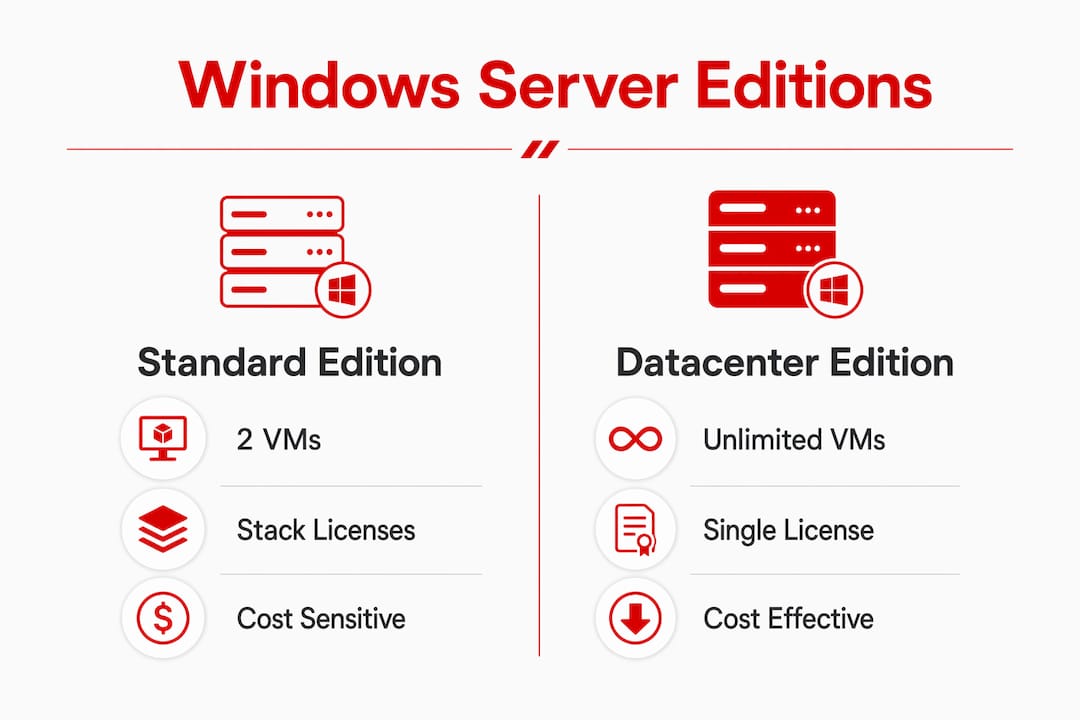
Windows Server Standard and Datacenter are the two primary editions for production workloads. Both require the same core-based licensing, but their virtualization rights are fundamentally different.
Standard Edition covers up to 2 virtual machines per license. If you need more VMs on the same physical host, you stack additional Standard licenses. Each additional license set covers two more VMs. The physical host itself must be fully licensed with each stack.
Datacenter Edition allows unlimited VMs on the licensed physical cores. One full Datacenter license covers the host and every VM running on it, with no cap. This makes Datacenter the correct choice for dense virtualization environments.
| Feature | Standard Edition | Datacenter Edition |
|---|---|---|
| VM coverage per license | 2 VMs | Unlimited VMs |
| License stacking for more VMs | Yes, required | Not needed |
| Hyper-V host licensing | Required | Required |
| Typical use case | Low VM density, physical workloads | High VM density, private cloud |
| Upgrade rights | Included with Software Assurance | Included with Software Assurance |
Software Assurance adds upgrade rights to either edition, allowing organizations to move to the next Windows Server version without purchasing a new license. For organizations on a multi-year hardware refresh cycle, Software Assurance often pays for itself.
Pro Tip: If a physical host runs more than 8 to 10 VMs, Datacenter Edition almost always costs less per VM than stacking Standard licenses. Run the math before you buy.
How do Client Access Licenses and VM licensing fit into the model?
A Client Access License (CAL) is a separate license required for every user or device that accesses a licensed Windows Server. CALs are mandatory per user or device and are not included in the server license itself. Forgetting CALs is one of the most common compliance gaps in mid-size organizations.
Microsoft offers two CAL types:
- User CAL: Covers one named user accessing the server from any number of devices. Best for employees with multiple devices, such as a laptop, desktop, and mobile phone.
- Device CAL: Covers one device used by any number of users. Best for shared workstations, kiosks, or shift-based environments where multiple employees share a single machine.
Choosing the wrong CAL type does not create a compliance violation on its own, but it does create unnecessary cost. A call center with 50 shared workstations and 150 employees is better served by 50 Device CALs than 150 User CALs.
Licensing by virtual machine is available only with subscription licenses or active Software Assurance, and it requires a minimum of 8 core licenses per VM. This model works well for organizations running a small number of high-value VMs where per-VM tracking is simpler than managing physical host licenses.
CALs still apply in VM licensing scenarios. Every user or device accessing a VM-licensed server still needs a CAL. The VM licensing model changes how the server license is counted, not whether access rights are required.
Pro Tip: Audit your user-to-device ratio before choosing between User and Device CALs. A ratio above 1:1 (more devices than users) generally favors User CALs. A ratio below 1:1 favors Device CALs.
Common compliance challenges and cost optimization strategies
Miscounting logical cores as physical cores is the most frequent compliance error. It leads to over-licensing and wasted spend, or under-licensing and audit exposure. Both outcomes are avoidable with accurate hardware documentation.
Common compliance pitfalls include:
- Counting Hyper-Threading logical cores instead of physical cores
- Failing to apply the 16-core server minimum on low-core hardware
- Running Datacenter workloads on Standard Edition licenses
- Assigning CALs by device when User CALs would cost less, or vice versa
- Neglecting to license the physical host when using VM-based licensing
Evaluating workloads to choose between Datacenter and Standard editions can reduce licensing costs significantly. Organizations running fewer than four VMs per host rarely need Datacenter Edition. Those running eight or more VMs almost always save money with Datacenter.
Many organizations run suboptimal Windows Server editions for their workloads, missing cost savings by not evaluating virtualization needs properly. A licensing review every 12 to 18 months catches edition mismatches before they compound.
Volume licensing and Enterprise Agreements give organizations predictable pricing and simplified license management across multiple servers. For organizations with five or more servers, volume licensing typically reduces per-unit cost and administrative overhead.
Pro Tip: Engage an authorized Microsoft licensing reseller or consultant before a major hardware refresh. A one-hour review can identify edition mismatches and CAL gaps that would otherwise surface in a Microsoft audit.
Key Takeaways
Microsoft server licensing requires core-based licenses for every physical server core, CALs for every user or device, and the correct edition choice based on VM density to maintain compliance and control costs.
| Point | Details |
|---|---|
| Core-based minimums apply | Every server needs at least 16 core licenses; every socket needs at least 8. |
| Physical cores only | Logical cores from Hyper-Threading do not count toward license requirements. |
| Edition choice drives VM cost | Datacenter covers unlimited VMs; Standard covers only 2 per license set. |
| CALs are mandatory | Every user or device accessing the server needs a separate User or Device CAL. |
| VM licensing requires Software Assurance | Per-VM licensing is only available with active Software Assurance or a subscription. |
Why licensing accuracy matters more than most IT teams realize
Physical core counting sounds straightforward until you are standing in front of a blade chassis with 16 servers, each with dual sockets and varying core counts. I have seen organizations confidently submit license counts based on Windows Task Manager data, only to discover during an audit that they had been counting logical cores the entire time. The retroactive cost was significant, and the fix required an emergency procurement cycle.
The edition question is equally underestimated. Standard Edition looks cheaper on the purchase order, and it is, until you stack it four or five times to cover a moderately dense Hyper-V host. At that point, Datacenter Edition would have cost less and removed the administrative burden of tracking license stacks per host.
CALs are the piece most organizations treat as an afterthought. They are not. A 200-user organization that skips CAL procurement is fully exposed in any audit, regardless of how correctly the server licenses are counted. The server license and the CAL are separate legal requirements.
The practical lesson is this: licensing accuracy is not a one-time exercise. Virtual infrastructure grows, hardware gets refreshed, and headcounts change. A licensing review tied to your annual IT planning cycle catches drift before it becomes a liability. Working with a certified Microsoft licensing partner removes the guesswork and gives you a defensible compliance position.
— Technology
How Technology Solutions Worldwide can help with Microsoft server licensing
Technology Solutions Worldwide is a Microsoft Solutions Partner with over 20 years of experience in Microsoft licensing, compliance audits, and migration services. Organizations including government agencies, Coca-Cola, and T-Mobile have used Technology Solutions Worldwide to resolve licensing complexity and reduce procurement costs.
Technology Solutions Worldwide provides license procurement support, compliance gap analysis, and edition optimization reviews for organizations of all sizes. Clients receive competitive discounts of 20–30% off Microsoft subscriptions through Technology Solutions Worldwide partner pricing. For organizations managing multiple Windows Server deployments, Microsoft licensing support from Technology Solutions Worldwide covers everything from initial core counting to volume agreement structuring. Contact Technology Solutions Worldwide to get a licensing review before your next hardware refresh or audit cycle.
FAQ
What is the minimum number of core licenses required per server?
Microsoft requires a minimum of 16 core licenses per physical server and 8 core licenses per physical processor, regardless of actual core count.
Do Hyper-Threading cores count toward Microsoft server licensing?
No. Only physical cores require licensing. Logical cores created by Hyper-Threading or SMT do not increase your license count.
What is the difference between a User CAL and a Device CAL?
A User CAL covers one named user on any number of devices. A Device CAL covers one device used by any number of users. Choose based on which count is lower in your environment.
When should you choose Datacenter Edition over Standard Edition?
Choose Datacenter Edition when a physical host runs more than four to six VMs. Standard Edition requires license stacking for each additional pair of VMs, which exceeds Datacenter pricing at higher VM densities.
Can you license Windows Server by virtual machine instead of by physical host?
Yes. Per-VM licensing requires a subscription or active Software Assurance and a minimum of 8 core licenses per VM. CALs are still required for all users or devices accessing those VMs.
Recommended
- Microsoft Licensing Help | Techsolworld
- Microsoft licenses and migration services
- Need Of Volume Licensing
- Microsoft Office License: A Must-Have for Every Business
Article generated by BabyLoveGrowth
PURCHASE SERVER LICENSING NOW FOR 30-40% OFF HERE.