
Microsoft 365 E3 license is an enterprise-grade cloud subscription that bundles Office productivity apps, Windows 11 Enterprise, and advanced security and compliance tools into one plan. The subscription targets organizations with 300 or more users that need a governed, device-managed environment at scale. Each user gets installations on up to 15 devices, a 100GB mailbox with litigation hold, and 1TB of OneDrive storage. For IT decision-makers evaluating what is Microsoft 365 e3 license and whether it fits their organization, this guide covers every component, recent 2025–2026 updates, pricing context, and deployment considerations.
What are the main features and components included in Microsoft 365 E3?
Microsoft 365 E3 is defined as a bundle of three distinct product suites: Office 365 E3, Windows 11 Enterprise E3, and EMS E3. Each suite contributes a separate layer of capability, and together they cover productivity, device management, and identity security.
Office productivity and storage
The Office layer includes full desktop and web versions of Word, Excel, PowerPoint, Outlook, OneNote, and Teams. Exchange Online Plan 2 provides a 100GB mailbox per user with litigation hold enabled, which is a requirement for most regulated industries. OneDrive for Business delivers 1TB of cloud storage per user. SharePoint Online and Microsoft Teams round out the collaboration stack.

Windows 11 Enterprise and device management
Windows 11 Enterprise adds features not available in the standard Windows 11 Pro edition, including DirectAccess, AppLocker, and Credential Guard. These controls matter for organizations managing a mix of corporate and personal devices. Microsoft Intune, included via EMS E3, handles mobile device management and mobile application management across that device fleet.
Security and identity tools
Enterprise Mobility + Security E3 delivers Azure Active Directory Premium P1 for conditional access and multifactor authentication, plus Microsoft Intune for endpoint management. Defender for Office 365 Plan 1 adds anti-phishing, safe links, and safe attachments for email and collaboration workloads. Azure Information Protection P1 enables document classification and basic rights management.
Key components at a glance:
- Office desktop and web apps on up to 15 devices per user
- 100GB Exchange Online mailbox with litigation hold
- 1TB OneDrive for Business storage
- Windows 11 Enterprise with Credential Guard and AppLocker
- Azure AD Premium P1 for conditional access
- Microsoft Intune for endpoint and mobile device management
- Defender for Office 365 Plan 1 for email threat protection
- Azure Information Protection P1 for document classification
Pro Tip: Activate litigation hold on Exchange Online mailboxes immediately after provisioning. Many organizations discover this was never turned on only when a legal request arrives.
How has Microsoft 365 E3 evolved recently?
The E3 license received a significant feature expansion in December 2025. Microsoft integrated Intune Remote Help and Advanced Analytics directly into the E3 tier, tools that previously required separate add-on purchases. These additions reduce support costs by enabling proactive endpoint detection and remote troubleshooting without leaving the Microsoft admin console.
The December 2025 update also expanded Defender for Office 365 Plan 1 with enhanced email security features. This means E3 subscribers now receive a broader set of threat detection signals without upgrading to E5. For IT teams managing phishing risk across large user populations, this is a material improvement.
The key 2025–2026 additions in order of operational impact:
- Intune Remote Help added to E3, enabling IT staff to remotely assist end users on managed devices without a separate license.
- Advanced Analytics integrated into Endpoint Manager, providing proactive device health monitoring and anomaly detection.
- Expanded Defender for Office 365 Plan 1 email security, covering additional threat categories previously reserved for Plan 2.
- Pricing adjustment effective July 1, 2026, reflecting global market changes while maintaining Teams-inclusive SKU availability.
The July 2026 pricing update gives IT budget owners advance notice to adjust annual licensing forecasts. Organizations on volume licensing agreements should review renewal dates against the July 1 effective date to avoid mid-cycle cost surprises.
What are the licensing details, pricing, and deployment scenarios?
Microsoft 365 E3 is positioned for organizations with 300+ users, though there is no hard user cap. The subscription scales to any enterprise size, which makes it practical for both mid-market companies and large multinationals. Pricing varies by region and agreement type.
Pricing and install rights
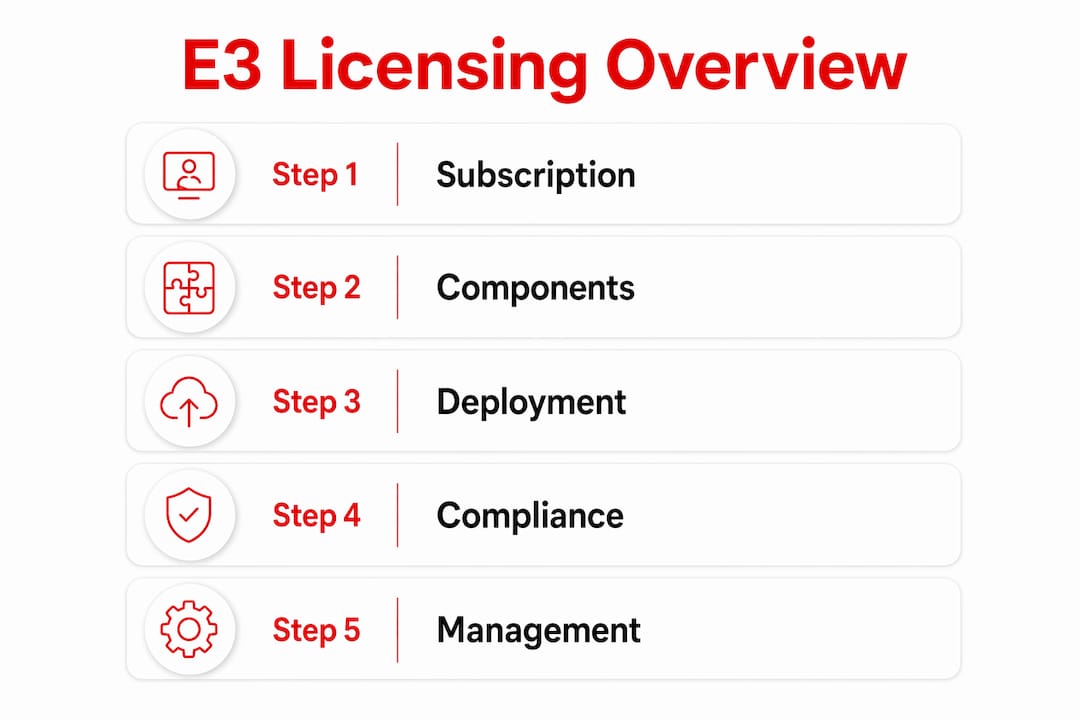
Each E3 seat covers installations on up to 15 devices per user across desktops, tablets, and smartphones. That device limit supports bring-your-own-device policies without requiring separate device licenses. Regional pricing varies; organizations in North America typically purchase through Microsoft’s Cloud Solution Provider channel or volume licensing agreements, where partners like Technology Solutions Worldwide offer discounts of 20–30% off standard subscription rates.
Mixing E3 and E5 in one tenant
Microsoft allows organizations to mix E3 and E5 licenses within a single tenant. This means IT teams can assign E5 to roles requiring advanced security analytics or Microsoft Purview compliance features, while keeping the majority of users on E3. The approach controls cost without forcing a full tenant upgrade.
| Scenario | Recommended license mix |
|---|---|
| Standard knowledge workers | E3 for all users |
| Security operations staff | E5 for SOC team, E3 for others |
| Legal and compliance roles | E5 for eDiscovery power users, E3 for standard staff |
| Executives with elevated risk | E5 for targeted protection, E3 for general workforce |
Transitioning from Business Premium to E3
Moving from Microsoft 365 Business Premium to E3 is not a simple license swap. Business Premium caps at 300 users, so organizations crossing that threshold must migrate to E3. The transition requires IT teams to reconfigure governance, auditing, and compliance tools post-deployment. eDiscovery and litigation hold settings do not carry over automatically. These capabilities are critical for ISO 27001 compliance and regulated industries, yet they remain among the most commonly misconfigured features after migration.
Pro Tip: Run a compliance configuration audit within 30 days of any E3 migration. Check eDiscovery case permissions, retention policies, and audit log settings before users generate data under the new plan.
Why choose Microsoft 365 E3 over other plans?
Vendor consolidation is the primary business driver for E3 adoption. A Forrester Total Economic Impact study found that E3 enables savings of up to $60 per user per month when organizations fully retire redundant third-party tools. That figure assumes active IT management and deliberate decommissioning of legacy systems. The savings do not materialize automatically.
The E3 license benefits extend across four operational areas:
- Hybrid work support. Intune and Azure AD P1 conditional access policies let IT enforce security controls on both corporate and personal devices without requiring a VPN for every connection.
- Compliance baseline. eDiscovery, litigation hold, and audit logging meet the baseline requirements for industries governed by HIPAA, SOX, or ISO 27001 frameworks. Organizations in regulated industries often find E3 covers their minimum compliance obligations without additional tools.
- Cost control. E3 replaces standalone purchases of Intune, Azure AD P1, Defender for Office 365, and Windows Enterprise licenses. Buying these separately costs significantly more per user per month.
- Endpoint security. Defender for Office 365 Plan 1 combined with Intune device management gives IT a coordinated response capability across email and endpoint vectors.
Mid-sized and enterprise organizations with managed IT infrastructure benefit most from Microsoft 365 E3. E5 is the appropriate choice only when advanced security analytics, Microsoft Sentinel integration, or Purview advanced compliance features are required.
When E5 makes sense: organizations running a security operations center, those subject to advanced eDiscovery requirements, or those needing Microsoft Defender for Identity with full attack chain visibility should evaluate the upgrade. For everyone else, E3 delivers the right balance of capability and cost.
Key Takeaways
Microsoft 365 E3 is the correct enterprise license for organizations that need governed productivity, device management, and a compliance baseline without paying for E5-level security analytics.
| Point | Details |
|---|---|
| Core bundle | E3 combines Office 365 E3, Windows 11 Enterprise E3, and EMS E3 in one subscription. |
| Device coverage | Each user can install apps on up to 15 devices, supporting BYOD and hybrid work policies. |
| 2025 feature additions | Intune Remote Help and Advanced Analytics joined E3 in December 2025 at no extra cost. |
| Compliance tools | eDiscovery and litigation hold require deliberate configuration after deployment to function correctly. |
| Cost savings | Forrester research shows E3 can save up to $60 per user per month when legacy tools are fully retired. |
The E3 decision is simpler than most IT teams make it
Organizations spend weeks comparing license tiers when the decision criteria are actually straightforward. E3 fits any organization above 300 users that needs Intune, Azure AD P1, and a compliant Exchange environment. The real work is not choosing E3. It is configuring it correctly after purchase.
The most consistent problem seen in E3 deployments is under-utilization of compliance and auditing tools. Teams activate the license, migrate mailboxes, and deploy Office apps. Then the audit logs sit unconfigured for months. eDiscovery cases are never set up. Retention policies are left at default. When a legal hold request or a security incident arrives, the organization discovers it was not actually using what it was paying for.
The second problem is the assumption that cost savings arrive automatically. The Forrester finding on vendor consolidation savings is real, but it requires deliberate action. IT teams must identify which third-party tools E3 replaces, set a decommission date, and follow through. Organizations that keep legacy tools running alongside E3 pay for both and realize neither benefit fully.
Training and change management are under-invested in almost every E3 rollout. Users who do not know how to use Teams, OneDrive, or the sensitivity labeling features in Office apps will default to old habits. The license value sits unused. A structured 90-day adoption program, even a lightweight one, consistently produces better utilization rates than a launch-and-leave approach.
— Technology
Technology Solutions Worldwide Microsoft 365 E3 licensing support
Technology Solutions Worldwide is a Microsoft Gold Partner with over 20 years of experience in Microsoft licensing and migration services. Organizations evaluating E3 can access competitive discounts of 20–30% off standard Microsoft subscription rates through Technology Solutions Worldwide volume licensing programs.
Technology Solutions Worldwide supports the full E3 deployment cycle, from initial license procurement through compliance configuration and end-user adoption. Clients including government agencies and enterprise corporations rely on Technology Solutions Worldwide to handle the complexity of volume licensing agreements and tenant migrations. Hence, for organizations transitioning from Business Premium or consolidating from multiple point solutions, Technology Solutions Worldwide provides structured deployment guidance to ensure compliance tools are configured correctly from day one.
FAQ
What is the Microsoft 365 E3 license?
Microsoft 365 E3 is an enterprise subscription that bundles Office 365 E3, Windows 11 Enterprise E3, and Enterprise Mobility + Security E3 into one per-user monthly plan. Therefore, it targets organizations with 300 or more users requiring productivity apps, device management, and a compliance baseline.
How many devices does an E3 license cover?
Each E3 license covers installations on up to 15 devices per user, including desktops, tablets, and smartphones. This device limit supports both corporate-issued and personal device policies within a single subscription.
What compliance features does Microsoft 365 E3 include?
E3 includes eDiscovery, litigation hold, audit logging, and Azure Information Protection P1. These features meet baseline compliance requirements for frameworks like ISO 27001, HIPAA, and SOX, but require deliberate configuration after deployment.
When should an organization upgrade from E3 to E5?
E5 is appropriate when an organization needs advanced security analytics, Microsoft Sentinel integration, Microsoft Defender for Identity, or Purview advanced compliance features. For standard enterprise productivity and basic security, E3 covers the requirement.
How do you get Microsoft 365 E3 at a discounted price?
Microsoft 365 E3 is available through Microsoft’s Cloud Solution Provider channel and volume licensing agreements. Microsoft Gold Partners like Technology Solutions Worldwide offer discounts of 20–30% off standard subscription rates for qualifying organizations.
Recommended
- Exploring Office 365 E1 (No Teams): A Comprehensive Overview – Technology Solutions
- Microsoft Office License: A Must-Have for Every Business
- Microsoft 365 Enterprise – Powerful tools to support your enterprise – Technology Solutions
- Microsoft 365 Business Premium vs Basic vs Standard
PURCHASE MICROSOFT 365 E3 FOR ONLY $25.60/MONTH PAID ANNUALLY FOR $307.20. BUY HERE.