
Microsoft tenant migration is defined as the process of moving users, mailboxes, files, and collaboration data from one Microsoft 365 tenant to another. Organizations trigger this process during mergers, acquisitions, divestitures, or internal restructurings. Supported workloads include Exchange Online mailboxes, SharePoint site collections, OneDrive for Business content, and Microsoft Teams data. The industry standard term for this process is cross-tenant migration, and Microsoft’s native tooling for it is called Migration Orchestrator. Understanding what is tenant migration in Microsoft environments is the first step toward planning a transition that keeps users productive and data intact.
What is tenant migration in Microsoft 365?
Cross-tenant migration is the technical process of transferring identity-linked data between two separate Microsoft 365 environments. Hence, each Microsoft 365 tenant is a dedicated, isolated instance with its own domain, users, licenses, and data. Moving between tenants is not a simple copy-paste operation. It requires coordinated identity mapping, license provisioning, and workload sequencing across Exchange Online, SharePoint, OneDrive, and Teams.
The Microsoft tenant migration process differs fundamentally from a standard data backup or file transfer. Source and target tenants must establish a trust relationship before any data moves. To sum up, administrators must create user objects in the target tenant, assign licenses, and configure routing before Migration Orchestrator can begin transferring content. This preparation work is manual and must be completed correctly to avoid provisioning errors.

What is cloud tenant migration at its core? It is an organizational change event, not just a technical task. The data movement reflects a business decision, and the technical execution must align with that decision’s timeline and scope.
What business scenarios require a Microsoft tenant migration?
Organizations undertake cross-tenant migrations for a defined set of business reasons. Each scenario carries different technical requirements and risk profiles.
- Mergers and acquisitions. Two companies merge and must consolidate separate Microsoft 365 tenants into one unified environment. Users from both organizations need access to shared resources under a single domain.
- Divestitures and spin-offs. A parent company separates a business unit into an independent entity. The new organization needs its own tenant, and the relevant users and data must move out of the parent tenant.
- Internal reorganizations. Large enterprises sometimes operate multiple tenants across regions or subsidiaries. Consolidating these into one tenant reduces administrative overhead and licensing complexity.
- Domain management changes. When a company rebrands or acquires a new primary domain, migrating to a new tenant may be the cleanest path to establishing the correct identity structure.
Each scenario impacts domain management and identity differently. A divestiture requires splitting a directory, while a merger requires merging two. The direction of the migration determines which tenant becomes the source and which becomes the target, and that distinction drives every subsequent technical decision.
What workloads move during a Microsoft tenant migration?
The scope of a cross-tenant migration covers multiple Microsoft 365 services, and each workload has its own dependencies and migration behavior.
- Exchange Online mailboxes. Email, calendar items, contacts, and folder structures move from the source mailbox to a provisioned target mailbox. Licensing must be assigned after the target MailUser is properly configured to avoid provisioning errors.
- SharePoint site collections. Sites, document libraries, list data, and associated permissions migrate to the target tenant. Permission mapping is complex because user identities change between tenants.
- OneDrive for Business. Personal file storage moves with the user’s identity. Files, folder structures, and sharing links require remapping after migration.
- Microsoft Teams. Chat history, channel data, and meeting records can move, but Teams data depends on Exchange Online mailboxes. Migrating Teams data should occur with or after Exchange mailboxes to preserve the user experience and avoid data loss.
Pro Tip: Map every workload dependency before you start. Teams data that moves before its associated mailbox will lose context and may cause user-facing errors that are difficult to reverse.
The inter-dependency between workloads is the most underestimated complexity in tenant migrations. A SharePoint site that references user identities from the source tenant will show broken permissions in the target until those identities are fully reconciled. Planning the migration sequence around these dependencies is not optional.
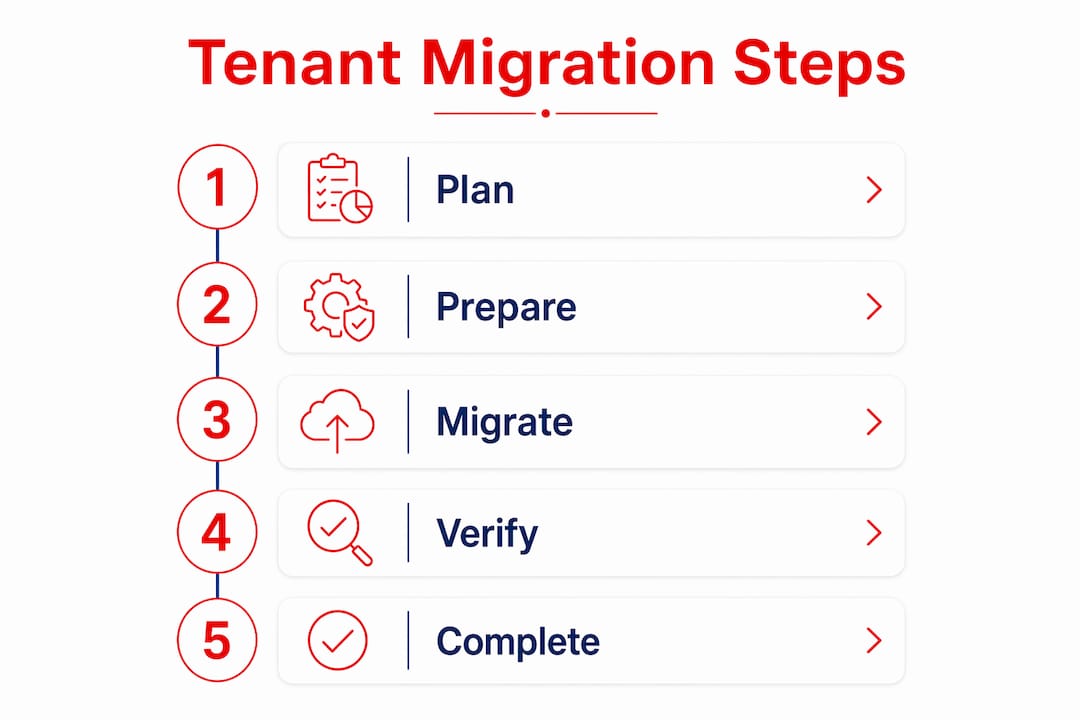
How does Migration Orchestrator simplify the tenant migration process?
Migration Orchestrator is Microsoft’s native tool for automating workload sequencing in cross-tenant migrations. It reduces the manual coordination burden that previously required administrators to track each workload’s status independently.
The tool works by sequencing workload migrations in the correct order based on known dependencies. Orchestrator intelligently sequences workload migrations to minimize failures caused by those dependencies. That means Exchange Online mailboxes move before Teams data, and SharePoint permissions are reconciled in the correct order.
Migration Orchestrator does not handle every task automatically. Administrators must complete several manual steps before the tool can run:
- Create user objects in the target tenant. Migration Orchestrator moves content, not identities. Target MailUser objects must exist before migration begins.
- Assign licenses. The target user must hold the correct Exchange Online subscription and a Cross Tenant User Data Migration license before the mailbox migration starts.
- Configure identity mapping. Source and target user accounts must be linked so Orchestrator knows where to send each user’s data.
- Set up trust between tenants. Both the source and target tenant administrators must authorize the migration relationship through the Microsoft 365 admin center.
- Validate prerequisites. Run pre-flight checks to confirm that all MailUser objects are correctly configured and that no holds or compliance policies will block the migration.
Pro Tip: Assign the Cross Tenant User Data Migration license before running any migration batch. Applying it after the batch starts causes provisioning errors that require the batch to be restarted.
Migration Orchestrator minimizes end-user disruption but does not eliminate downtime entirely. Users typically experience a brief period where their mailbox is in a read-only state during the final cutover. Therefore, communicating this window in advance is a standard part of migration planning.
What migration strategies and best practices ensure success?
The two primary migration strategies for cross-tenant migrations are phased migration and Big Bang migration. Choosing between them depends on organization size, risk tolerance, and business continuity requirements.
| Strategy | Description | Best for |
|---|---|---|
| Phased migration | Users migrate in batches over weeks or months | Large organizations, high complexity |
| Big Bang migration | All users migrate in a single planned event | Smaller organizations, tight deadlines |
Phased migration reduces risk by limiting the blast radius of any single failure. If a batch encounters errors, only that group of users is affected. Big Bang migration is faster but requires near-perfect preparation because errors affect everyone simultaneously.
The discovery phase is the most critical part of any migration plan. Analyzing mailboxes, permissions, and compliance holds before migration prevents timeline delays and performance bottlenecks. Identity and permission mapping errors are the most common cause of migration failures.
Key best practices for a successful Microsoft tenant migration include:
- Run a pilot migration first. Pilot migrations using vanity domains are ideal for documenting assumptions and reducing enterprise risk before full cutover. Test with 5–10 users before scaling to the full organization.
- Plan coexistence carefully. Calendar free/busy sharing and Teams federation between tenants reduces operational friction during phased migrations. Users on both tenants need to collaborate while the migration is in progress.
- Manage legacy MailUser objects. After migration, the source mailbox converts to a MailUser with a targetAddress for routing. Managing these legacy objects is necessary to avoid directory conflicts and maintain mail routing integrity.
- Audit compliance holds before migration. Mailboxes under litigation hold or retention policies require special handling. Overlooking these causes batch failures and compliance risk.
- Communicate the migration timeline to users. Users who understand what will change, when it will change, and what they need to do experience fewer support issues post-migration.
For organizations considering the benefits of tenant migration alongside licensing strategy, aligning both work-streams from the start avoids the common mistake of provisioning the wrong license tier for migrated users.
Key Takeaways
Microsoft tenant migration requires coordinated identity mapping, license provisioning, and workload sequencing across Exchange Online, SharePoint, OneDrive, and Teams to succeed without disrupting users.
| Point | Details |
|---|---|
| Cross-tenant migration definition | Moving users, mailboxes, and files between two separate Microsoft 365 tenants. |
| Migration Orchestrator role | Automates workload sequencing but requires manual identity mapping and license setup first. |
| Discovery phase priority | Auditing mailboxes, permissions, and compliance holds before migration prevents the most common failures. |
| Phased vs. Big Bang strategy | Phased migration reduces risk for large organizations; Big Bang suits smaller, well-prepared environments. |
| Post-migration MailUser management | Legacy MailUser objects must be maintained to preserve mail routing and avoid directory conflicts. |
What working on large-scale tenant migrations has taught me
The technical documentation for Microsoft tenant migration is thorough. The part that documentation cannot fully prepare you for is the organizational complexity underneath the technical steps.
The most common failure point is not a tool error or a licensing gap. It is an incomplete discovery phase. Organizations routinely underestimate how many mailboxes carry litigation holds, how many SharePoint sites have broken permission inheritance, or how many Teams channels reference external guests who do not exist in the target tenant. These issues surface during the pilot migration, not before it. Running a pilot is not optional for any organization with more than 100 users.
Most importantly, coexistence planning is the second area where migrations stall. When a phased migration runs over several weeks, users on the source tenant and users already on the target tenant must collaborate daily. Without calendar free/busy sharing and Teams federation configured correctly, productivity drops and the migration loses executive support. That loss of support is harder to recover from than any technical error.
The licensing dimension is frequently handled too late. Administrators often focus on the data movement and treat licensing as an afterthought. Applying the Cross Tenant User Data Migration license after a batch starts forces a restart. Technology Solutions Worldwide approach of aligning licensing and migration services from the planning stage eliminates this class of error entirely.
The organizations that complete tenant migrations on schedule are the ones that invest in communication as much as in technical preparation. Users who receive clear, timely information about what will change generate fewer support tickets and adapt faster.
— Technology
Technology Solutions Worldwide Microsoft licensing and migration support
Tenant migrations require precise licensing at every stage, from pre-migration provisioning to post-migration reconciliation. Getting that licensing wrong delays batches and creates compliance gaps.
Technology Solutions Worldwide is a Microsoft Gold Partner with over 20 years of experience supporting organizations through complex Microsoft 365 transitions. To sum up, the team provides Microsoft licensing support and services covering Cross Tenant User Data Migration licenses, Exchange Online subscriptions, and full migration planning assistance. Hence, clients including government agencies and Fortune 500 corporations rely on Technology Solutions Worldwide for licensing accuracy and migration execution. Organizations can access Microsoft subscriptions at 20–30% below standard pricing. Contact Technology Solutions Worldwide directly ([email protected]) to align your licensing strategy with your migration timeline before the first batch runs.
FAQ
What is the tenant migration definition in Microsoft 365?
Microsoft tenant migration, also called cross-tenant migration, is the process of moving users, mailboxes, SharePoint data, and OneDrive content from one Microsoft 365 tenant to another. Hence, it is triggered by business events such as mergers, acquisitions, or divestitures.
What does Migration Orchestrator do?
Migration Orchestrator automates workload sequencing during a cross-tenant migration to minimize failures caused by dependencies between Exchange Online, SharePoint, and Teams. Therefore, Administrators must still create user objects, assign licenses, and map identities manually before the tool runs.
What is the difference between phased and Big Bang migration?
Phased migration moves users in batches over time, reducing risk for large organizations. Therefore, Big Bang migration moves all users in a single event and suits smaller organizations with thorough preparation and tight deadlines.
Why is the discovery phase so important?
Consequently, discovery identifies mailbox holds, permission complexity, and compliance policies that block migration batches. Hence, skipping or rushing discovery is the leading cause of timeline delays and migration failures.
What happens to the source mailbox after migration?
After migration, the source mailbox converts to a MailUser object with a targetAddress that routes mail to the new tenant. To sum up, these legacy MailUser objects must be managed carefully to maintain mail routing and avoid directory conflicts.
Recommended
- How to Use Microsoft 365 to Modernize Your Workplace? – Technology Solutions
- Go daddy: Migrating from GoDaddy Microsoft 365 To Microsoft 365
- Microsoft 365 for Business – Technology Solutions
- Microsoft licenses and migration services
In conclusion, for a quote on your upcoming migration by our experts and get assigned a senior Microsoft Architect, email [email protected] or call (800)998-2792.
Great explanation. You explained everything very clearly, and every point is easy to understand from a learning perspective.
In our company, we recently had a requirement for tenant-to-tenant migration, and while working on that process we used the Aryson Microsoft 365 Migration Tool by “Aryson Technologies” (https://reference-url-citation.invalid/1). The migration process went smoothly, and it handled the overall transfer process quite efficiently.
Based on our experience, it worked really well for our migration requirements and delivered better results than we expected.