
Microsoft 365 Business is defined as a cloud-based subscription service that combines productivity apps, collaboration tools, and security features for organizations with up to 300 users. It replaces the older Office 365 branding and represents Microsoft’s unified answer to the modern digital workplace. Small and medium business owners evaluating what is Microsoft 365 Business will find a single subscription that covers email, document creation, video conferencing, cloud storage, and device management. Therefore, Technology Solutions Worldwide has guided clients ranging from government agencies to corporations like Coca-Cola and T-Mobile through this exact decision for over 20 years.
What is Microsoft 365 Business and which plans are available?
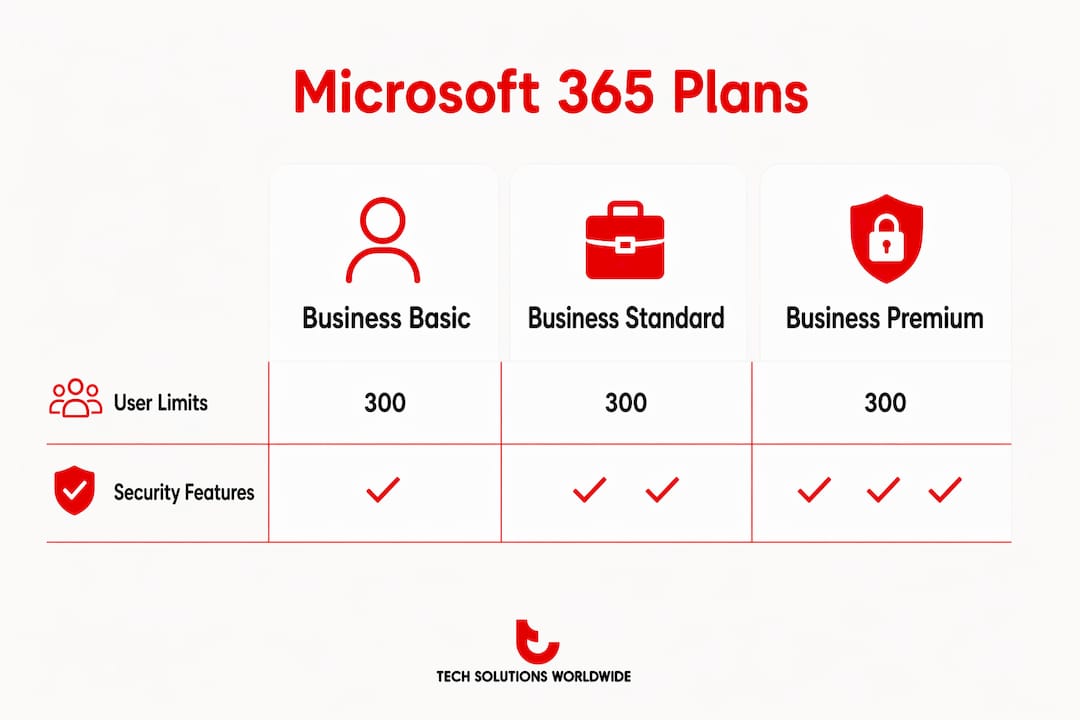
Microsoft 365 Business supports up to 300 users with integrated productivity and security services in one subscription. Hence, that 300-user ceiling is a firm boundary. Organizations that grow beyond it must move to Microsoft 365 Enterprise plans, which carry different pricing and feature sets.
Three core plans exist under the Microsoft 365 Business umbrella.
Microsoft 365 Business Basic is the entry-level tier. It includes web and mobile versions of Word, Excel, PowerPoint, and Outlook, plus Microsoft Teams, Exchange email, SharePoint, and 1 TB of OneDrive cloud storage per user. Desktop app installs are not included. Therefore, this plan fits businesses whose teams primarily work in a browser or on mobile devices.
Microsoft 365 Business Standard adds full desktop installs of the Office apps on up to five PCs or Macs per user. It also includes Teams webinars, video editing tools, and the full SharePoint experience. Additionally, Teams calling features and advanced scheduling tools come with this tier. For most SMBs that need installed software alongside cloud access, Standard is the practical choice.

Microsoft 365 Business Premium is the top tier. It includes everything in Standard plus enterprise-level security tools such as Microsoft Defender for Business, ransomware protection, Azure Active Directory Premium P1, and Microsoft Intune for device management. Premium is the right fit for businesses handling sensitive data or operating in regulated industries.
All three plans now include access to AI-powered Copilot Chat, which automates routine tasks and assists with drafting, summarizing, and communication. AI integration is a growing differentiator across all Microsoft 365 Business tiers in 2026.
| Plan | Desktop apps | Security tools | Best for |
|---|---|---|---|
| Business Basic | Web and mobile only | Standard | Browser-first teams |
| Business Standard | Up to 5 installs per user | Standard | Most SMBs |
| Business Premium | Up to 5 installs per user | Advanced (Defender, Intune) | Data-sensitive businesses |
How does Microsoft 365 Business improve productivity and collaboration?
Microsoft 365 Business improves productivity by putting every core work tool inside one connected environment. Teams, SharePoint, OneDrive, and the Office apps share a single identity layer, so files open directly in meetings, comments sync in real time, and version history never gets lost in email threads.
The practical gains for SMBs include:
- Real-time co-authoring in Word, Excel, and PowerPoint means two people can edit the same document simultaneously without sending files back and forth.
- Microsoft Teams consolidates chat, video calls, file sharing, and project channels in one interface, reducing the need for separate communication tools.
- OneDrive and SharePoint give every user cloud storage access from any device, which directly supports remote and hybrid work.
- Copilot Chat drafts emails, summarizes long documents, and generates meeting notes automatically, cutting time spent on administrative tasks.
- Power Automate, included in Standard and Premium, lets non-technical staff build automated workflows for approvals, notifications, and data entry without writing code.
Unified communication and file sharing through Teams and OneDrive removes the friction that slows down distributed teams. That friction reduction compounds over weeks and months into measurable time savings.
Pro Tip: Set up shared SharePoint team sites for each department instead of relying on individual OneDrive folders. Shared sites keep project files accessible to the whole team even when one person is out.
Why do businesses switch to Microsoft 365 and migrate to the cloud?
The primary reason SMBs migrate to Microsoft 365 is cost control combined with a security upgrade. On-premises servers require hardware refresh cycles, IT maintenance contracts, and separate software licenses. Microsoft 365 Business consolidates those costs into a predictable per-user monthly fee.
The top reasons businesses make the switch:
- Security without a dedicated IT team. Business Premium includes Microsoft Defender for Business and device management through Intune. SMBs get enterprise-grade protection without hiring a full security staff.
- Remote and hybrid work support. Every app and file is accessible from any device with an internet connection. Teams and OneDrive work on Windows, macOS, iOS, and Android.
- License flexibility. Mixing license tiers within one organization lets SMBs assign Premium to executives handling sensitive data and Basic to frontline staff who only need email and Teams.
- AI readiness. Cloud modernization with Microsoft 365 positions SMBs to adopt AI tools faster than businesses still running on-premises infrastructure.
- Reduced IT complexity. Microsoft handles server maintenance, security patches, and software updates. Internal IT staff can focus on business-specific projects instead of routine upkeep.
Pro Tip: Before migrating, audit which users actually need desktop app installs. Assigning Business Basic to browser-only users and Standard only where installs are required can cut your total licensing cost significantly.
For SMBs exploring multichannel digital tools alongside Microsoft 365, the cloud foundation Microsoft provides makes integration with marketing and CRM platforms considerably more straightforward.
What pricing and user limits apply, and how do you choose the right plan?
Microsoft 365 Business plans are capped at 300 users. That limit applies across all three tiers. Organizations expecting to exceed 300 users should evaluate Microsoft 365 Enterprise plans from the start to avoid a forced migration later.
Cost per user increases with each tier. Business Basic carries the lowest per-user price. Further, Business Standard sits in the middle. To clarify, Business Premium is the highest-cost tier but includes security tools that would otherwise require separate purchases.
Key factors for choosing the right plan:
- Do users need installed desktop apps? If yes, Standard or Premium is required. Basic covers web and mobile only.
- Does the business handle sensitive or regulated data? Premium’s Defender for Business and Intune device management justify the higher cost for legal, healthcare, and financial services firms.
- Can you mix plans? Selective license assignment by user role is the most effective cost control strategy for SMBs. To clarify, Power users get Standard or Premium. Light users get Basic.
- Is the team fully remote? Basic covers remote work well if desktop installs are not required.
A detailed breakdown of plan features and pricing helps SMBs map specific user roles to the right tier before committing to a subscription.
How to get started with Microsoft 365 Business
Getting started with Microsoft 365 Business follows a clear sequence. Subsequently, skipping steps, particularly around data migration and user training, is the most common cause of adoption problems.
- Assess your current environment. Inventory existing email systems, file storage locations, and software licenses. Identify which users need which plan tier.
- Choose a purchase channel. Buying directly from Microsoft is straightforward. Purchasing through a certified Microsoft Solutions Partner delivers discounts of 20–30% plus migration support and consolidated billing that direct purchases do not include.
- Assign licenses by role. Use the admin center to assign the correct plan to each user. Avoid assigning Premium to every user by default.
- Migrate data. Move email from existing servers using Microsoft’s migration tools. Transfer files to OneDrive or SharePoint in organized folder structures before users switch over.
- Train your team. Microsoft provides free training resources through Microsoft Learn. Structured onboarding reduces the time before teams reach full productivity.
- Configure security settings. Enable multi-factor authentication for all users on day one. In Business Premium, configure Intune device policies and Defender for Business alerts immediately after setup.
Microsoft licensing support from a certified partner simplifies steps two through four considerably, particularly for businesses migrating from legacy on-premises systems.
Key Takeaways
Microsoft 365 Business is the most cost-effective way for SMBs with up to 300 users to consolidate productivity apps, cloud storage, collaboration tools, and security into one subscription.
| Point | Details |
|---|---|
| Three distinct plans | Basic, Standard, and Premium serve different user needs and budgets within the 300-user limit. |
| License mixing saves money | Assigning Basic to light users and Premium to power users reduces total subscription cost. |
| Premium includes advanced security | Microsoft Defender for Business and Intune are included in Premium at no extra charge. |
| Partner purchases offer discounts | Certified partners provide 20–30% discounts plus migration support unavailable through direct purchase. |
| Migration requires planning | Auditing users, migrating data, and training teams before go-live prevents adoption failures. |
Technology Solutions Worldwide’s take on Microsoft 365 Business for SMBs
After working with SMBs across industries for over 20 years, the pattern is consistent. Above all, businesses that struggle with Microsoft 365 adoption almost always skipped the license audit step. In addition, they assigned the same plan to every user, overspent on features nobody used, and then blamed the platform when the real problem was poor planning.
The license mixing strategy is underused. A 50-person company with 10 executives, 20 office staff, and 20 frontline workers does not need 50 Business Premium licenses. On the other hand, assigning Premium to the 10 executives, Standard to the 20 office staff, and Basic to the frontline workers cuts the monthly bill substantially while giving every user exactly what they need.
The AI tools in Microsoft 365 Business are also more practical than most SMB owners expect. Consequently, Copilot Chat is not a novelty. It handles real administrative work: summarizing email threads, drafting proposals, and generating meeting notes. Teams that adopt it consistently report faster turnaround on routine communication tasks.
The one recommendation that applies to every SMB regardless of size: buy through a certified partner. The 20–30% discount alone covers the cost of migration support in most cases. Most importantly, Direct Microsoft purchases offer no equivalent service layer.
— Technology Solutions Worldwide
Microsoft 365 Business licensing and migration support
Technology Solutions Worldwide specializes in Microsoft 365 Business licensing and migration for SMBs. As a certified Microsoft Solutions Partner with over 20 years of experience, the firm provides licensing and migration services that include plan selection, license assignment, data migration, and post-setup security configuration.
Clients receive 20–30% discounts off standard Microsoft subscription pricing, consolidated billing, and direct access to licensing specialists. As a result, organizations from government agencies to private corporations have used Technology Solutions Worldwide to reduce licensing costs and accelerate their move to the Microsoft cloud. Most importantly, for SMBs that want expert guidance on Microsoft 365 licensing without the complexity of managing it internally, Technology Solutions Worldwide provides a direct path from evaluation to deployment.
FAQ
What is Microsoft 365 Business Basic?
Microsoft 365 Business Basic is the entry-level Microsoft 365 Business plan. It includes web and mobile Office apps, Teams, Exchange email, SharePoint, and 1 TB of OneDrive storage per user, but does not include desktop app installs.
How many users can Microsoft 365 Business support?
Microsoft 365 Business plans support a maximum of 300 users. Organizations that exceed this limit must move to Microsoft 365 Enterprise plans.
What security features does Microsoft 365 Business Premium include?
Business Premium includes Microsoft Defender for Business, ransomware protection, Azure Active Directory Premium P1, and Microsoft Intune for device management, all included in the subscription price.
Is it cheaper to buy Microsoft 365 through a partner?
Purchasing through a certified Microsoft Solutions Partner delivers discounts of 20–30% off standard pricing, plus migration support and consolidated billing not available through direct Microsoft purchase.
Can a business mix different Microsoft 365 Business plans?
A business can assign different plan tiers to different users within the same tenant. Mixing Basic, Standard, and Premium licenses by user role is a standard cost-control strategy for SMBs.
Recommended
- Microsoft 365 Business Premium vs Basic vs Standard
- Microsoft 365 for Business – Technology Solutions
- Microsoft 365 Enterprise Bundle: What Organizations Need to Know
- What Does Microsoft Business Standard Include in 2026
Microsoft 365 Subscriptions list and discount prices available, CLICK HERE.