
The Microsoft identity platform is defined as a cloud-based authentication and authorization service that centralizes identity management across web, desktop, and mobile applications. Understanding why Microsoft identity platform matters is now a foundational requirement for any IT team operating in a hybrid or cloud-first environment. The platform’s core engine, Microsoft Entra ID, replaces legacy perimeter-based security with continuous, adaptive access evaluation. Organizations that skip this transition leave authentication gaps that attackers actively exploit. The importance of Microsoft identity grows directly with the complexity of your application portfolio and user base.
Why Microsoft identity platform matters for Zero Trust security
Identity is the primary security perimeter in modern enterprise architecture, replacing the traditional network boundary as the main control point. Every access request must be explicitly verified, regardless of where it originates. This shift defines the Zero Trust model, and Microsoft Entra ID is the engine that makes it operational.
Legacy perimeter defenses assumed that anything inside the corporate network was trustworthy. That assumption fails completely in a world of remote work, SaaS applications, and cloud workloads. Conditional Access became the driving principle for access policies, enforcing “never trust, always verify” at every access attempt. The practical result is that access decisions factor in user location, device health, sign-in risk score, and application sensitivity simultaneously.

Microsoft Entra ID evaluates these signals in real time through continuous access evaluation. If a user’s risk profile changes mid-session, such as a sign-in from an unfamiliar location, the platform revokes access immediately without waiting for a token to expire. This capability closes a gap that static, time-based token models leave open.
The platform’s identity-based security features include multi-factor authentication, passwordless sign-in, and risk-based conditional access policies. These controls work together rather than as isolated tools.
Key security capabilities the platform delivers:
- Conditional Access policies that evaluate device compliance, user risk, and location before granting access
- Multi-factor authentication enforced at the policy level, not left to individual app developers
- Continuous access evaluation that revokes sessions in real time when risk conditions change
- Passwordless authentication using Windows Hello, FIDO2 keys, or the Microsoft Authenticator app
- Identity Protection that detects anomalous sign-in patterns and triggers automated remediation
Pro Tip: Configure named locations in Conditional Access policies to block sign-ins from high-risk geographies automatically. This single policy change reduces brute-force exposure without adding friction for legitimate users.
What are the core components and developer tools?
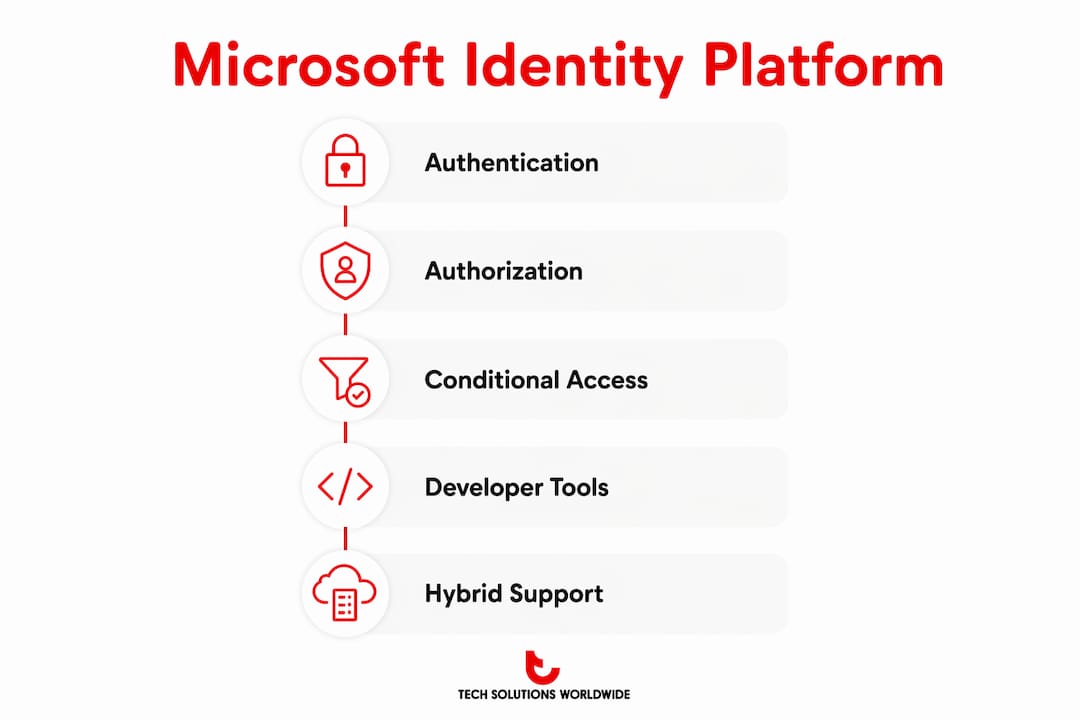
The Microsoft identity platform centralizes authentication for web, desktop, and mobile applications, giving developers a single integration point instead of building custom token logic for each app. The architecture rests on three pillars: Microsoft Entra ID as the identity directory, the Microsoft Authentication Library (MSAL) as the developer SDK, and a set of open standards for protocol-level interoperability.
Supported authentication protocols
The choice of authentication protocol directly affects security and operational reliability. The platform supports OAuth 2.0, OpenID Connect, and SAML 2.0. OAuth 2.0 handles authorization flows for API access. OpenID Connect adds an identity layer on top of OAuth 2.0 for user authentication. SAML 2.0 supports enterprise federation scenarios, particularly for legacy applications that predate modern token standards.
Selecting OAuth 2.0 or OpenID Connect over legacy protocols is a foundational architectural decision. Legacy protocols like NTLM and basic authentication lack the token-based controls that modern conditional access policies require. Authentication failures often result from protocol mismatches or legacy app dependencies rather than user error, which is why protocol selection belongs in the architecture review, not the deployment checklist.
MSAL and native authentication
MSAL abstracts the complexity of token acquisition, caching, and renewal. Developers call MSAL methods rather than constructing raw HTTP requests to the token endpoint. This reduces implementation errors and keeps token handling consistent across the application portfolio.
Native authentication shifts token transport and security responsibility to application developers, unlike browser delegation. It gives development teams full control over the sign-in UI, which matters for branded mobile experiences. The tradeoff is that the app must handle token storage and transport security directly, which requires deliberate security review.
The platform also operates on an eventually consistent directory model, meaning changes to identities may take time to propagate across the directory. Applications that depend on immediate consistency after a user or group update must design for this delay. Polling or event-driven approaches handle this more reliably than assuming instant propagation.
| Component | Function | Key consideration |
|---|---|---|
| Microsoft Entra ID | Identity directory and token issuer | Supports hybrid and cloud-only deployments |
| MSAL | Developer SDK for token acquisition | Handles caching and renewal automatically |
| OAuth 2.0 / OpenID Connect | Authorization and authentication protocols | Required for modern conditional access integration |
| SAML 2.0 | Enterprise federation | Best suited for legacy app integration |
| Native authentication | Full UI control for mobile apps | Requires in-app token security management |
Pro Tip: Use MSAL’s token cache serialization feature in server-side apps to avoid unnecessary token requests. Redundant token calls add latency and can trigger throttling on high-traffic tenants.
How does the platform simplify IT operations?
The benefits of Microsoft identity platform for IT operations center on reducing the administrative overhead of managing credentials, access rights, and compliance evidence across a large user base. Single sign-on allows users to access cloud and on-premises resources with one credential set, eliminating the password sprawl that drives both help desk tickets and credential-based attacks. Fewer passwords mean fewer resets, fewer phishing targets, and cleaner audit trails.
Automated provisioning and deprovisioning through the System for Cross-domain Identity Management (SCIM) protocol ties account lifecycle to group membership. When an employee changes roles or leaves the organization, access updates automatically rather than depending on manual IT tickets. This closes the orphaned account problem that compliance auditors consistently flag.
The advantages of identity management at this level extend to governance and reporting. Microsoft Entra ID generates unified audit logs across all connected applications. IT teams can produce access certification reports, sign-in logs, and risky user reports from a single console rather than aggregating data from multiple systems.
Operational benefits IT teams gain directly:
- Reduced help desk load from fewer password reset requests after SSO deployment
- Automated access reviews that prompt managers to certify user access on a defined schedule
- Privileged Identity Management that enforces just-in-time access for admin roles, reducing standing privilege exposure
- Unified audit logs covering all integrated applications for compliance reporting
- Self-service password reset that lets users recover accounts without IT intervention
How does the platform support hybrid and multicloud environments?
Microsoft Entra ID manages identities for users, groups, applications, devices, and external partners in hybrid and multicloud environments. This breadth is what makes it the identity backbone for organizations that run workloads across on-premises data centers, Azure, and third-party cloud platforms. A single identity plane covering all these environments removes the need for separate identity silos per platform.
The platform supports federated identity, which means external partners and customers can authenticate using their own identity providers. Business-to-business (B2B) collaboration lets guest users sign in with their organizational accounts. Business-to-consumer (B2C) scenarios support social account sign-in through providers like Google and Facebook, alongside local account registration.
For IT and cloud architects, Microsoft Entra ID is critical for Role-Based Access Control and privileged access management across hybrid clouds. RBAC assignments in Azure tie directly to Entra ID groups, so access governance for cloud resources uses the same identity objects as on-premises resources. Managed identities for Azure workloads eliminate the need for service account credentials entirely, replacing them with automatically rotated tokens.
Integration coverage across a typical enterprise environment includes:
- SaaS applications connected via the Entra ID app gallery, which lists thousands of pre-integrated applications with automated provisioning support
- On-premises applications published through Microsoft Entra application proxy without requiring inbound firewall rules
- Custom-built applications registered in the Entra ID app registration portal and integrated via MSAL or direct protocol calls
- Device identities managed through Entra ID join or hybrid join, enabling device-based conditional access policies
- Workload identities for Azure services, pipelines, and containers using managed identities or workload identity federation
The enterprise access control capabilities that the platform enables extend naturally to multiuser enterprise software environments, where consistent identity governance across applications reduces both security risk and administrative complexity.
Key Takeaways
The Microsoft identity platform is the foundational control plane for Zero Trust security, replacing legacy perimeter defenses with continuous, identity-based access evaluation across hybrid and multicloud environments.
| Point | Details |
|---|---|
| Identity replaces the perimeter | Microsoft Entra ID enforces Zero Trust by verifying every access request based on real-time risk signals. |
| Protocol choice is architectural | Selecting OAuth 2.0 and OpenID Connect over legacy protocols is a security decision, not just a technical preference. |
| SSO reduces operational cost | Single sign-on cuts password sprawl, help desk tickets, and credential-based attack surface simultaneously. |
| Hybrid coverage is built in | Entra ID manages users, devices, workloads, and external partners across on-premises and multicloud environments. |
| Developer tools reduce risk | MSAL handles token acquisition and caching, removing a common source of authentication implementation errors. |
The case for prioritizing identity platform adoption now
Technology Solutions Worldwide has worked with organizations across government and enterprise sectors for over 20 years, and the pattern is consistent. The teams that struggle most with security incidents are not the ones with the weakest firewalls. They are the ones still running authentication on legacy protocols with no conditional access layer in place.
The common mistake is treating identity platform adoption as a migration project rather than a security control deployment. For instance, organizations that frame it as a migration focus on feature parity with their old system. Additionally, organizations that frame it as a security control deployment ask a different question: what access decisions are we currently making blindly? That question leads to faster, more targeted implementation.
The importance of Microsoft identity also shows up in compliance scenarios. Audit-ready access logs, automated access reviews, and just-in-time privileged access are not optional features for regulated industries. They are the evidence that auditors request first. Building that evidence base on a unified platform is far more defensible than assembling it from disconnected tools.
The one recommendation Technology Solutions Worldwide gives IT leaders evaluating identity solutions is to start with the authentication protocol audit. Hence, identify every application still using basic authentication or NTLM. That list defines your immediate risk exposure and your migration priority order. Everything else follows from that baseline.
— Technology Solutions Worldwide
Microsoft identity platform licensing and implementation support
Technology Solutions Worldwide provides Microsoft licensing support for organizations deploying Microsoft Entra ID and the broader identity platform across their environments. Licensing the right tier of Entra ID, whether P1 for conditional access or P2 for Identity Protection and Privileged Identity Management, directly determines which security controls are available.
Organizations deploying identity solutions at scale benefit from volume licensing options that reduce per-seat costs while maintaining full access to enterprise-grade features. Technology Solutions Worldwide offers 20–30% discounts on Microsoft subscriptions and provides migration planning support to move organizations off legacy authentication systems onto the Microsoft identity platform with minimal disruption.
FAQ
What is the Microsoft identity platform?
The Microsoft identity platform is a cloud-based authentication and authorization service built on Microsoft Entra ID. Hence, it centralizes identity management for web, desktop, and mobile applications using open standards including OAuth 2.0, OpenID Connect, and SAML 2.0.
How does Microsoft Entra ID support Zero Trust security?
Microsoft Entra ID enforces Zero Trust by evaluating user risk, device compliance, and location at every access attempt through Conditional Access policies. Therefore, continuous access evaluation revokes sessions in real time when risk conditions change, closing the gap left by static token expiration.
What authentication protocols does the platform support?
The platform supports OAuth 2.0, OpenID Connect, and SAML 2.0. OAuth 2.0 and OpenID Connect are the recommended choices for new applications because they support modern conditional access controls that legacy protocols cannot accommodate.
What is MSAL and why should developers use it?
MSAL is the Microsoft Authentication Library, a developer SDK that handles token acquisition, caching, and renewal automatically. Hence, using MSAL reduces authentication implementation errors and keeps token handling consistent across an organization’s application portfolio.
Does the platform work in hybrid environments?
Microsoft Entra ID manages identities across on-premises, Azure, and third-party cloud environments from a single control plane. It supports hybrid-joined devices, application proxy for on-premises apps, and managed identities for cloud workloads, covering the full range of enterprise identity scenarios.
Recommended
- Microsoft defenders for identity features in Microsoft 365 portal
- What is Microsoft Entra ID? A Complete Overview – Technology Solutions
- 5 Big Changes to Microsoft Endpoint Manager!
- Microsoft 365 Enterprise – Powerful tools to support your enterprise – Technology Solutions
PURCHASE MICROSOFT SECURITY SUBSCRIPTION SOFTWARE HERE.