
The Microsoft Select Plus Agreement is defined as a non-expiring, transactional volume licensing contract that lets eligible organizations purchase perpetual Microsoft software licenses as needed, without committing to an enterprise-wide deployment. Understanding what is Microsoft Select Plus Agreement matters most for midsize and large organizations, government agencies, and academic institutions managing 250 or more devices. The agreement operates under a single master contract while allowing decentralized purchasing across departments or subsidiaries. It supports optional Software Assurance and offers three distinct billing structures to align with different budget cycles. For public sector organizations in particular, Select Plus remains one of the most flexible volume licensing options available from Microsoft.
What is the Microsoft Select Plus Agreement and who qualifies?
The Microsoft Select Plus Agreement is a transactional licensing model designed for organizations with 250 or more devices. It covers perpetual licenses for on-premises Microsoft software, with Software Assurance available as an optional add-on. Unlike enterprise agreements that require organization-wide commitments, Select Plus lets organizations buy only what they need, when they need it.
Eligible organizations include:
- Midsize and large commercial organizations with 250 or more qualifying devices
- Government entities at federal, state, and local levels
- Academic institutions including universities, colleges, and school districts
- Nonprofit organizations that meet Microsoft’s volume licensing criteria
The agreement’s non-expiring master contract structure is one of its defining features. Once established, the master agreement does not expire, which removes the pressure of renewal deadlines that affect other licensing programs. Organizations can add Affiliate Registration Forms (ARFs) under the master agreement, each assigned a unique Public Customer Number (PCN), to support purchasing across multiple departments or subsidiaries.
Select Plus covers on-premises software licenses only. It does not extend to cloud-only subscriptions like Microsoft 365 or Azure under the same terms. Organizations seeking cloud coverage alongside on-premises licenses typically pair Select Plus with a separate cloud agreement or transition to a different program entirely.

Pro Tip: If your organization has multiple departments with independent IT budgets, the ARF and PCN structure in Select Plus lets each unit purchase independently while still rolling up under one master agreement for consolidated reporting.
How does purchasing and billing work under Select Plus?
Select Plus operates on a transactional model. Organizations place orders as needs arise rather than committing to a fixed license count at the start of a term. This makes the program well suited for organizations whose software needs fluctuate across fiscal years.
Software Assurance billing under Select Plus comes in three forms:
- Prepay (PE): The full Software Assurance cost is paid upfront at the time of the license order. This option suits organizations with available capital and a preference for fixed, one-time payments.
- Affiliate Anniversary (AE): Payments are spread across the Software Assurance term and aligned to the affiliate registration’s anniversary date. Initial payments are prorated based on when the order falls within the anniversary cycle.
- Order Anniversary (OE): Payments align to the anniversary of each individual order rather than the affiliate registration date. This option works well when orders are placed throughout the year and budget alignment per order is preferred.
The table below summarizes the key differences between the three billing types:
| Billing Type | Payment Timing | Best For |
|---|---|---|
| Prepay (PE) | Full payment at order | Organizations with upfront capital |
| Affiliate Anniversary (AE) | Prorated to affiliate date | Departments with shared budget cycles |
| Order Anniversary (OE) | Prorated to order date | Organizations with staggered purchasing |
Billing synchronization across affiliates reduces financial complexity for large organizations. When multiple affiliates align their anniversary dates, finance teams can consolidate payment schedules and simplify reconciliation.
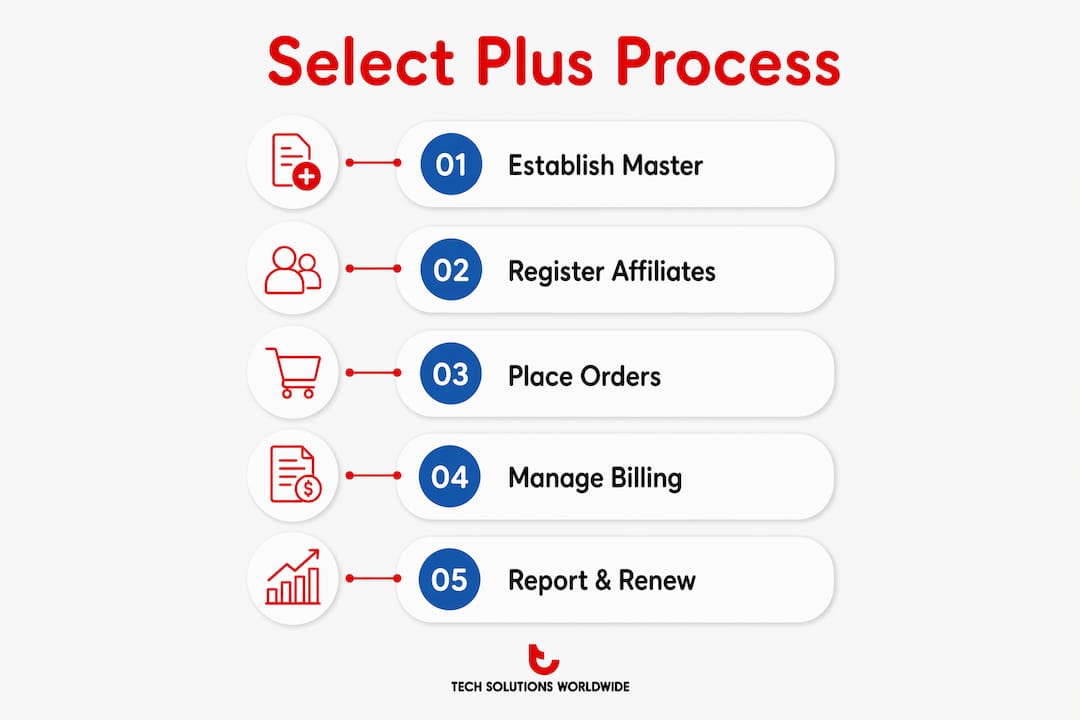
All ordering and invoice management takes place through the Microsoft Volume Licensing Central portal. The portal provides a centralized interface for placing orders, reviewing invoices, and tracking license status across all affiliate registrations under the master agreement.
Pro Tip: Choose Affiliate Anniversary billing if your organization runs on a unified fiscal year. It keeps all Software Assurance payments predictable and tied to a single renewal window, which simplifies budget planning significantly.
How can organizations manage and report on Select Plus licenses?
Accurate license management under Select Plus requires understanding the two-tier structure of master agreements and affiliate registrations. Each affiliate PCN holds its own license records, but all PCNs roll up to the master agreement for consolidated visibility. Organizations that fail to map this hierarchy correctly often end up with gaps in their compliance reporting.
Microsoft Volume Licensing Central’s Reporting and Analytics workspace provides interactive, in-browser reporting tools specifically for Select Plus. These tools allow real-time filtering by affiliate, product, license type, and date range. Users can customize column views, schedule automated exports, and preview license data without downloading static files.
Common pitfalls in Select Plus license management include:
- Relying on manual spreadsheets instead of the Volume Licensing Central reporting interface
- Failing to reconcile affiliate PCNs against the master agreement regularly
- Missing proration calculations when Software Assurance is added mid-cycle
- Overlooking inactive affiliates that still carry license records affecting compliance counts
Many organizations underutilize the in-browser filtering features available in Volume Licensing Central, defaulting instead to manual spreadsheet methods. This creates audit risk and slows down compliance reporting. Switching to the interactive interface reduces the time needed to prepare for internal or external audits.
Best practices for reporting efficiency include scheduling monthly exports from Volume Licensing Central, assigning a dedicated license administrator for each affiliate PCN, and conducting a quarterly reconciliation of all active and inactive registrations. Organizations that follow these steps maintain cleaner records and respond faster to audit requests.
Pro Tip: Use Volume Licensing Central’s column customization feature to display only the data fields relevant to your compliance team. Removing irrelevant columns reduces visual noise and speeds up review cycles during audits.
What is the current status of the Microsoft Select Plus Agreement?
The Microsoft Select Plus Agreement was retired for commercial customers effective july 1, 2016. Commercial organizations can no longer enroll in new Select Plus agreements or place new orders under existing commercial registrations. This retirement pushed most commercial customers toward alternative volume licensing programs.
Government and academic organizations are not affected by the commercial retirement. These entities can still open new affiliate registrations, place orders, and manage existing agreements through Volume Licensing Central. The distinction matters because government and academic IT departments often operate on longer procurement cycles and benefit from the non-expiring, transactional structure that Select Plus provides.
| Customer Type | Select Plus Status | Recommended Path |
|---|---|---|
| Commercial organizations | Retired since july 2016 | Transition to alternative volume licensing programs |
| Government entities | Active, orders permitted | Continue or expand existing agreements |
| Academic institutions | Active, orders permitted | Continue or expand existing agreements |
For government and academic organizations still on Select Plus, the program continues to deliver value through its flexible purchasing model and decentralized affiliate structure. Organizations in these sectors that manage large device counts across multiple departments find the PCN-based structure particularly useful for tracking licenses by unit without losing master-level visibility.
Organizations considering future transitions should evaluate whether their current Microsoft licensing agreements align with their cloud adoption plans. Select Plus covers on-premises software only, so organizations moving workloads to Microsoft Azure or Microsoft 365 will need to layer in cloud-specific agreements as part of their long-term procurement strategy.
Key Takeaways
The Microsoft Select Plus Agreement remains the most flexible non-expiring transactional licensing option for government and academic organizations managing 250 or more devices under a decentralized purchasing structure.
| Point | Details |
|---|---|
| Eligibility requirement | Organizations need 250 or more devices; government and academic entities remain eligible after commercial retirement. |
| Non-expiring master agreement | The master contract does not expire, removing renewal pressure and supporting long-term procurement planning. |
| Three billing options | Prepay, Affiliate Anniversary, and Order Anniversary billing align Software Assurance payments to different budget cycles. |
| Decentralized purchasing | Affiliate Registration Forms with unique PCNs let departments buy independently under one master agreement. |
| Reporting tools | Volume Licensing Central’s interactive interface replaces manual spreadsheets for faster, audit-ready license tracking. |
Technology Solutions Worldwide’s take on Select Plus for public sector IT
The biggest mistake organizations make with Select Plus is treating it as a simple catalog purchase program. The affiliate PCN structure exists for a reason. Organizations that ignore it end up with license records scattered across registrations, no clear master-level view, and compliance gaps that surface at the worst possible time during an audit.
Billing option selection deserves more attention than most IT procurement teams give it. Affiliate Anniversary billing works well when departments share a fiscal year. Order Anniversary billing fits organizations that purchase throughout the year and need payment schedules tied to individual orders. Choosing the wrong billing type creates misaligned payment dates that complicate budget reconciliation for years.
The reporting tools inside Volume Licensing Central are genuinely useful, but only if teams actually use them. The interactive filtering and scheduled export features exist precisely because static spreadsheet exports create version control problems and slow down compliance reviews. Organizations that build a monthly reporting habit inside the portal stay audit-ready without scrambling.
For government and academic organizations, Select Plus still represents a practical licensing path. The non-expiring agreement structure, the absence of an enterprise-wide commitment, and the affiliate-level purchasing flexibility make it a strong fit for decentralized public sector IT environments. The key is managing it with the same discipline you would apply to any enterprise contract.
— Technology Solutions Worldwide
Microsoft Select Plus licensing support from Technology Solutions Worldwide
Technology Solutions Worldwide provides direct support for organizations managing Microsoft Select Plus agreements and related volume licensing programs.
Technology Solutions Worldwide holds over 20 years of experience as a Microsoft Solutions Partner, working with government agencies, academic institutions, and large enterprises including Coca-Cola and T-Mobile. The team provides Microsoft licensing support covering agreement structure, billing option selection, affiliate registration setup, and compliance reporting. Organizations that need help auditing existing Select Plus registrations or planning a transition to alternative programs can access tailored guidance through Technology Solutions Worldwide’s licensing services. Competitive discounts of 20–30% off Microsoft subscriptions are available for qualifying organizations. Contact Technology Solutions Worldwide to review your current volume licensing needs and identify the right path forward.
FAQ
What is the Microsoft Select Plus Agreement?
The Microsoft Select Plus Agreement is a non-expiring, transactional volume licensing contract for organizations with 250 or more devices. It allows perpetual license purchases with optional Software Assurance and no organization-wide commitment.
Is Select Plus still available in 2026?
Select Plus is retired for commercial customers since july 1, 2016, but remains fully active for government and academic organizations, which can still place new orders and manage existing agreements.
What are the billing options under the Microsoft Select Plus program?
Select Plus offers three Software Assurance billing types: Prepay (PE), Affiliate Anniversary (AE), and Order Anniversary (OE). Each option differs in payment timing and how costs are prorated across the agreement term.
How does the affiliate registration structure work in Select Plus?
Each affiliate registers under the master agreement using an Affiliate Registration Form and receives a unique Public Customer Number (PCN). This lets departments purchase independently while all records roll up to the master agreement for consolidated reporting.
What tool does Microsoft provide for managing Select Plus licenses?
Microsoft Volume Licensing Central includes a Reporting and Analytics workspace with interactive, in-browser filtering and scheduled export features designed specifically for Select Plus license tracking and compliance reporting.